

Public Page Widgets: Goal, Mortgage, Profitability and Risk
A public portfolio page can show more than value and return. It can also show what the portfolio is for: a passive income goal, a mortgage that coupons and dividends help pay off, the portfolio's leaders and laggards, and its risk. This guide covers what each of these widgets shows, how to set it up and what a guest sees when you hide amounts.
- Where to add: in the page builder — the “Available Widgets” block, or right on your public page — “Configure” → “Add widget”.
- Goal and mortgage: “Goal: passive income”, “Mortgage payment covered by passive income”, “Mortgage parameters” and “Mortgage payment schedule”.
- Analytics and risk: “Asset Profitability”, “Portfolio Flows & Activity”, “Value at Risk (VaR 95%)” and “Max Drawdown”.
- Hidden amounts: a guest sees percentages, terms and years, while rubles show as “••••”. A password or a secret link lifts page-wide hiding.
1. How to add a widget to the page
In the builder. Open “Settings” → “Communities & Access” and click “+ Create Link”, or open an existing page. The builder is described in detail in “Public Page Builder”.
- In the “Available Widgets (N)” block, find the widget with the “Search widgets...” field — it searches titles and descriptions. Hovering over a row opens a preview.
- Click the row — the widget appears in the page preview on the active tab.
- Each card in the preview has width and height switches, an eye button “Hide absolute amounts” and a remove button. The goal and mortgage widgets also have their own gear inside the card — see below.
- Publish with “Create Page” or “Save Changes”.
On the public page itself. The author sees a “Configure” button in the header: it turns on edit mode right on the page. “Add widget” with a search box appears below the grid, and the cards get the same size and amount-hiding controls. “Done” saves the layout.
To check what a visitor will see, click “View as guest”: the page reloads the way an anonymous visitor sees it — with masked amounts and hidden notes. “Back to author view” returns the usual view.
2. “Goal: passive income”
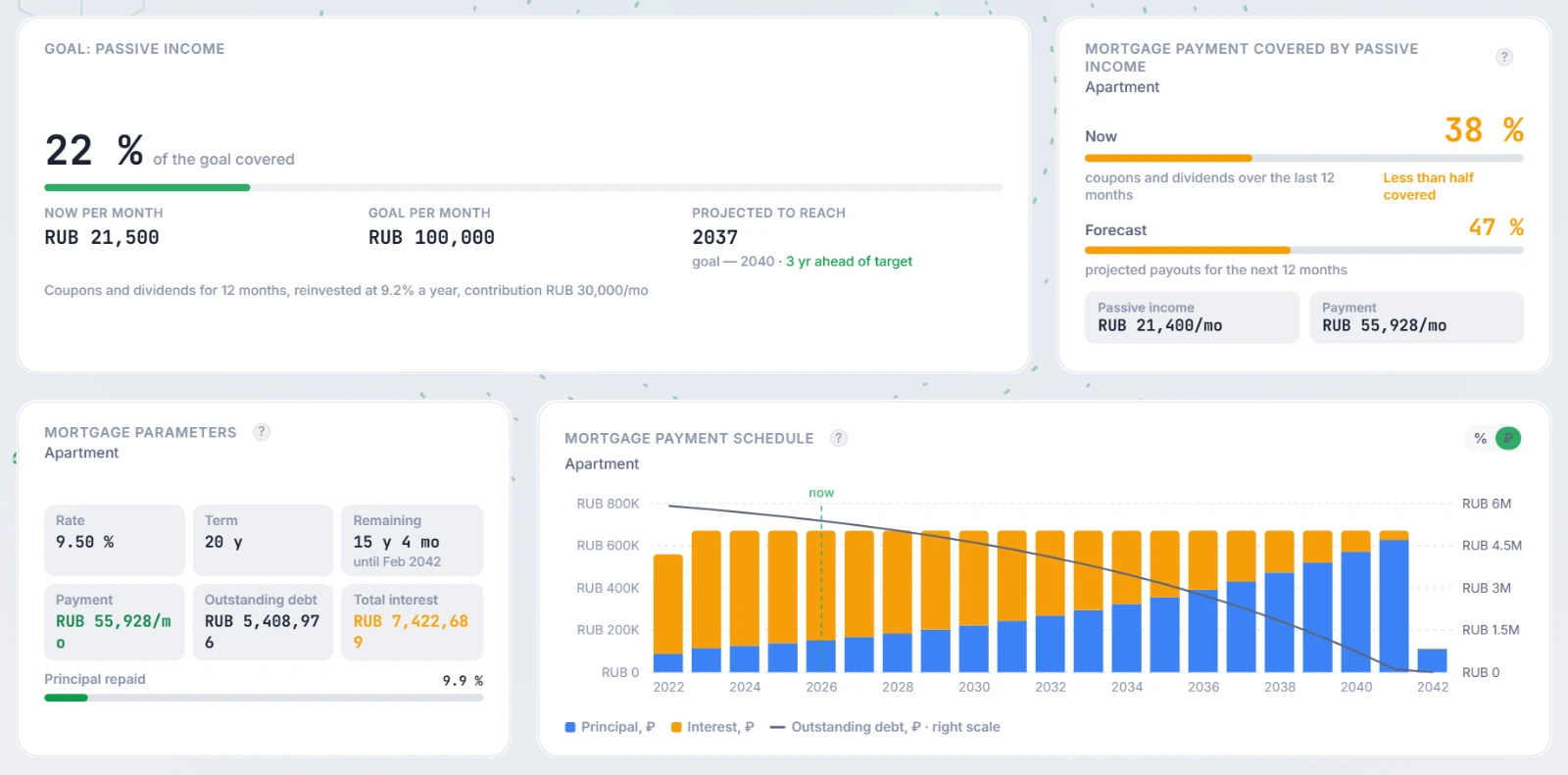
The widget answers “how far am I from the goal”: what share of the desired monthly income coupons and dividends already cover, and in which year the goal is reached at current payouts.
- “of the goal covered” — a large percentage and a progress bar: current monthly income divided by the target.
- “Now per month” — coupons and dividends expected over the next 12 months, divided by 12. Bond amortizations and redemptions are not counted: they return invested money rather than earn income.
- “Goal per month” — the target income from the settings.
- “Projected to reach” — the year income grows to the target, or “Goal reached”, or “Not reachable with current payouts” (for example, when there are no payouts). If a target year is set, the line below shows “goal — 2040” and a comparison: “N yr ahead of target”, “right on target” or “N yr behind target”.
- The line at the bottom explains the basis of the projection: “Coupons and dividends for 12 months, reinvested at X% a year” and, if set, the monthly contribution.
Settings. The “Goal settings” gear in the widget header is available to the author in the builder and in “Configure” mode:
- “Target monthly income, ₽” — without it the widget does not project anything: the author sees “Set the target income in the widget settings”, a guest sees “No goal set”;
- “Target year” — from the current year up to 80 years ahead;
- “Monthly contribution, ₽ (optional)”.
The gear itself explains the projection: payouts are reinvested at the current payout yield (annual coupons and dividends relative to portfolio value), contributions are added once a year, inflation is not included. It is the same capital growth model as in the “Financial Freedom” calculator (see “FIRE Movement Model”).
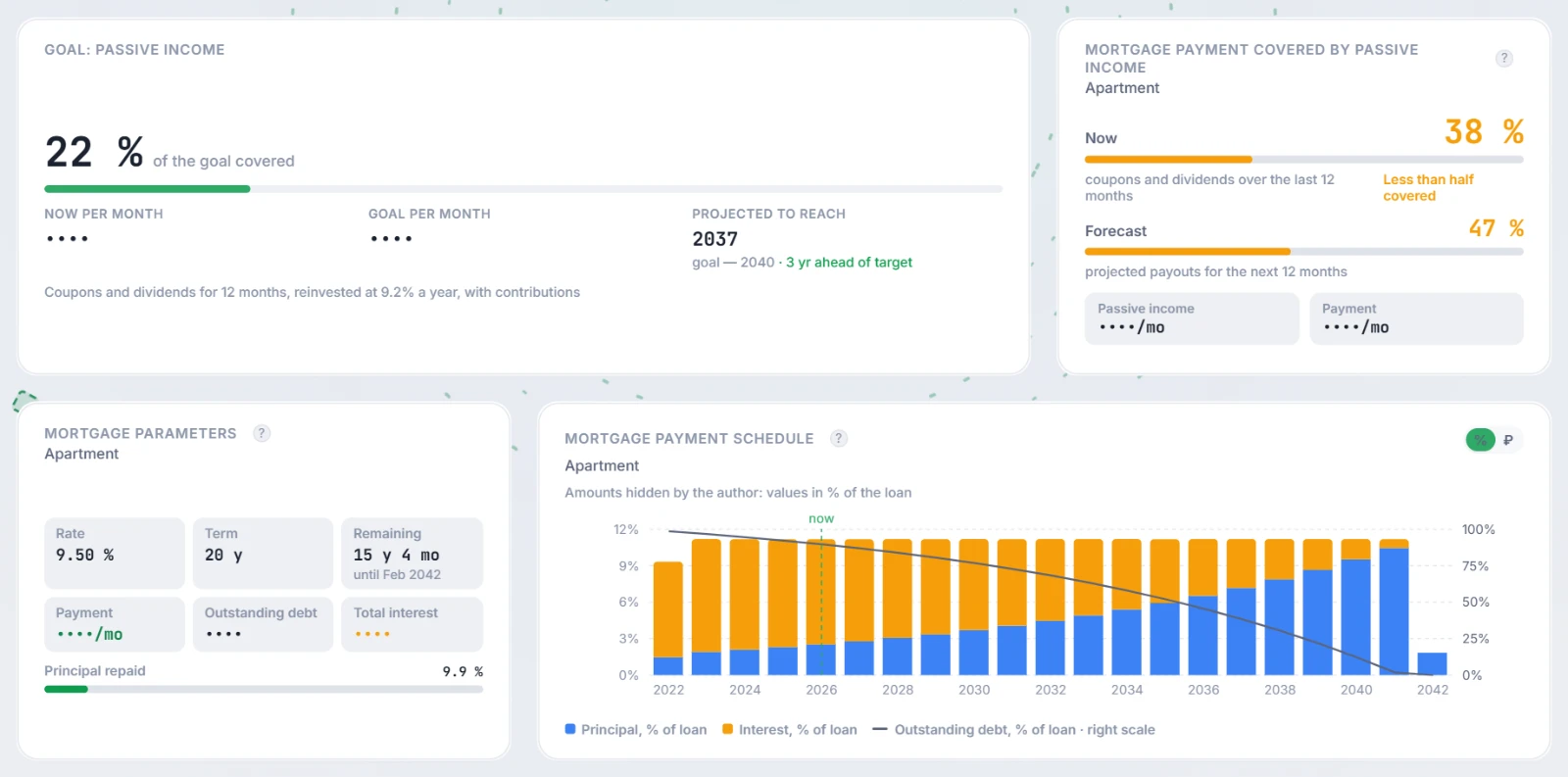
With hidden amounts the server sends every amount as a percentage of the target and strips the ruble target and contribution from the widget settings. A guest sees the share of the goal covered, the projected year and the target year, while “Now per month” and “Goal per month” show as “••••”; the bottom line says “with contributions” instead of the contribution amount.
3. Mortgage widgets
Three widgets show the author's mortgage from the Expenses → Mortgages section — how to set it up is covered in the Mortgages section guide. The server builds the schedule from that section's parameters the same way the section does.
Which mortgage to show. If you have several mortgages, the author picks one in the builder or in “Configure” mode with the gear next to the mortgage name — “Mortgage to show”. The default option is “Active in the Mortgage section”. If there is no mortgage, the author sees the hint “Add a mortgage in the Mortgage section”, a guest sees “No mortgage data”.
“Mortgage payment covered by passive income”
What part of the monthly mortgage payment the portfolio's coupons and dividends cover:
- “Now” — based on payouts over the last 12 months against the current payment, rated “Payment fully covered”, “More than half covered” or “Less than half covered”;
- “Forecast” — based on projected payouts for the next 12 months against the payments over the same 12 months;
- the “Passive income” and “Payment” tiles per month.
Once the mortgage is repaid, the widget shows “Mortgage is paid off”.
“Mortgage parameters”
Key loan figures as tiles: “Rate” (marked “differentiated” for differentiated payments), “Term”, “Remaining” with the end date, “Payment”, “Outstanding debt” and “Total interest”. Below is the “Principal repaid” bar in percent.
“Mortgage payment schedule”
Yearly bars are split into “Principal” and “Interest”; the line is “Outstanding debt” on its own right scale from zero to the loan amount. A dashed “now” line marks the current year.
The “% / ₽” switch in the header turns the chart into percent of the loan and back; axes, tooltips and legend follow it. The author's choice in edit mode is saved as the default view, a visitor's choice is remembered only in their browser tab.
With hidden amounts the rubles of a mortgage are masked in all three widgets at once — if the page has “Hide exact amounts in RUB” on, or if at least one widget of that mortgage has “Hide absolute amounts” on. The rate, term, remaining term, repaid share and coverage percentages stay visible; payment, outstanding debt, total interest and passive income show as “••••”. The schedule switches to percent of the loan with the note “Amounts hidden by the author: values in % of the loan”, and the “₽” option of the switch is disabled with the tooltip “Amounts hidden by the author” — rubles are not reconstructed from percentages.
The server sends only what the published widgets render: without “Mortgage payment covered by passive income” on the page there is no portfolio passive income in the data, and mortgages not picked by any widget are not sent at all.
4. “Asset Profitability” and “Portfolio Flows & Activity”
“Asset Profitability”
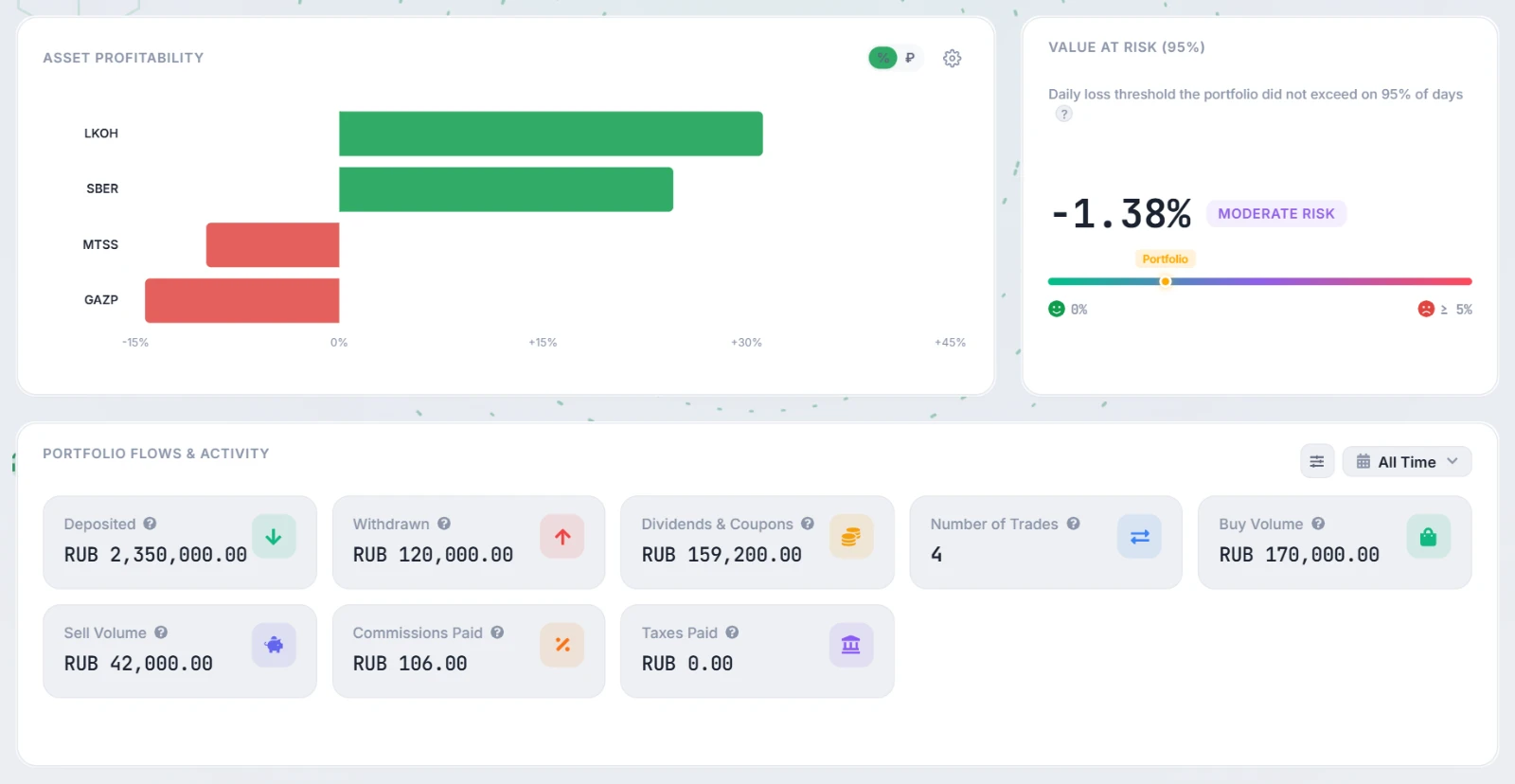
Horizontal bars show the portfolio's leaders and laggards by unrealized position return: green bars are in profit, red ones at a loss. The “% / ₽” switch changes return in percent to profit or loss in rubles; the bar tooltip shows “Yield:” and “P&L:”.
The “Asset limits” gear sets how many holdings to show as “Profitable (+):” and “Unprofitable (-):” — “Auto” (by widget height), 1, 2, 3, 5, 10 or “All”. Each visitor picks this for themselves; it is stored in their browser.
With hidden amounts rubles are not sent, while position returns in percent remain: bars are drawn by percent, the “₽” switch is disabled and the tooltip has no “P&L:” line. The bar colour always matches the value shown.
“Portfolio Flows & Activity”
A wide widget with the tiles “Deposited”, “Withdrawn”, “Dividends & Coupons”, “Number of Trades”, “Buy Volume”, “Sell Volume”, “Commissions Paid” and “Taxes Paid”. The period is picked in the header: “All Time”, “1 Year”, “YTD”, “6 Months”, “3 Months” or “1 Month”.
- The “Calculation Settings” menu has “Estimate deposits from trades”: if the broker has no deposit history, “Deposited” is estimated from purchases minus sales and payouts and marked “~ Est.”.
- There are no buttons for adding non-trading operations on a public page — a guest can only look.
- Guests receive only deposits, withdrawals, dividends and coupons (without tickers), so the “Taxes Paid” tile stays empty on a public page.
With hidden amounts the server sends neither cash flows nor trades for this widget, and the amounts show as “••••”. If amounts are hidden on the widget itself, “Number of Trades” is also “••••” rather than a false zero. If another trades widget on the page hides trade amounts, “Buy Volume”, “Sell Volume” and “Commissions Paid” are masked too.
5. VaR 95% and “Max Drawdown”
Two compact risk widgets, each with a value, a risk rating and a scale:
- “Value at Risk (VaR 95%)” — the daily loss that, based on the portfolio's value history, was not exceeded on 95% of days (historical method). It is not the maximum loss: on the remaining 5% of days losses can be larger. Rating: “Low risk” below 1%, “Moderate risk” up to 2.5%, “High risk” above; the scale goes to 5%.
- “Max Drawdown” — the deepest fall in portfolio value from a previous high to the following low over the whole history. Deposits and withdrawals change the portfolio value and can affect the figure. Rating: “Low risk” below 10%, “Moderate risk” up to 25%, “High risk” above; the scale goes to 50%.
If there is too little value history, the widget says so: “Not enough portfolio value history to calculate VaR” or “…to calculate drawdown”. Formulas are in “Risk & Efficiency Metrics” (sections VaR and Max Drawdown).
With hidden amounts. VaR and drawdown are percentages, not amounts, so the page-wide “Hide exact amounts in RUB” option does not hide them. The value is replaced with “***” only if “Hide absolute amounts” is on for the widget itself — just like the Sharpe and Sortino ratios.
6. What guests see with hidden amounts
Amounts can be hidden in two ways: for the whole page — with the “Hide exact amounts in RUB” option in the builder, for a single widget — with the eye button “Hide absolute amounts”. Masking is done by the server: hidden rubles never reach the guest's browser. More in “Privacy settings”.
| Widget | Guest sees | Hidden |
|---|---|---|
| “Goal: passive income” | Share of the goal covered, projected year, target year | Income and goal per month, contribution amount |
| “Mortgage payment covered by passive income” | “Now” and “Forecast” percentages, coverage rating | “Passive income”, “Payment” |
| “Mortgage parameters” | Rate, term, remaining term, “Principal repaid” | “Payment”, “Outstanding debt”, “Total interest” |
| “Mortgage payment schedule” | Chart in % of the loan | “₽” mode |
| “Asset Profitability” | Position returns in percent | Profit and loss in rubles |
| “Portfolio Flows & Activity” | Tiles and period | All amounts; trade count — if amounts are hidden on the widget itself |
| VaR 95% and “Max Drawdown” | Value and risk rating | Only with “Hide absolute amounts” on the widget itself |
If the page has “Allow unmasking (via password or secret link)” on, a guest with the password clicks “Unmask data” (or opens a secret link) and sees the amounts hidden by “Hide exact amounts in RUB”. Amounts hidden with the widget's own “Hide absolute amounts” button stay hidden. More in “Access Codes & Secret Links for Shared Portfolios”.
7. Frequently Asked Questions (FAQ)
Will a guest see my target amount if amounts are hidden?
No. The target income and contribution are stripped from the widget settings for everyone except the author, and the goal data arrives as percentages of the target. A guest sees the share covered and the year, but not rubles.
I hid amounts only on the “Mortgage payment schedule”, but rubles also disappeared from “Mortgage parameters”. Is that a bug?
No, this is by design: the widgets of one mortgage share the same data, and if at least one of them hides amounts, that mortgage's rubles are masked in all of them. Otherwise the payment or the debt could be recovered from a neighbouring widget.
Why do I see all amounts although they are hidden on the page?
The author always sees the full page. To look at it through a visitor's eyes, click “View as guest”.
Why are VaR and drawdown visible although “Hide exact amounts in RUB” is on?
They are percentages and do not reveal the portfolio size, so the page-wide option does not hide them. If you do not want to show them either, turn on “Hide absolute amounts” on those widgets.