

The Mortgages Section: Early Repayment, Tax Refunds, Rent or Buy
The Mortgages section calculates the payment, overpayment and schedule for one or several mortgages, shows the effect of early repayments, spreads tax refunds over years and compares buying with renting and investing the difference at your portfolio’s yield.
- Where: Expenses → Mortgages; more calculations via “Add Mortgage”.
- Early repayment: “One-time” or “Monthly”, “Reduce Term” or “Reduce Payment” — with interest saved and term reduced.
- Refunds: up to RUB 260,000 for the property and RUB 390,000 for interest, by year within 13% of your income.
- Analytics: DTI, payment cover by the portfolio, refund reinvestment and Rent vs Buy at the portfolio yield capped at 10%.
1. Why the Mortgages section exists
For many investors a mortgage is the largest recurring expense, and decisions about it compete directly with the portfolio: should spare cash go into early repayment or into more bonds, should you buy a flat or rent and invest the difference? The Mortgages section brings these calculations onto one screen and links them to your portfolio: several blocks use its value and yield from Firewire.
It is a scenario calculator, not a ledger of your real loan: the bank, statements and actual payments are not imported — you enter every parameter yourself.
2. Where to find it and how to keep several mortgages
- In the sidebar open the Expenses group → Mortgages (page address
/expenses/mortgage). The counter next to the menu item shows how many calculations you have saved. - Mortgage tabs sit above the blocks. On your first visit Firewire creates “Mortgage 1” with sample parameters.
- Add Mortgage creates another calculation — for example, to compare two banks or your loan and your parents’ loan. The pencil on a tab is Rename, the cross is Delete (you cannot delete the only mortgage, and deletion asks for confirmation).
- Configure switches on edit mode: blocks can be dragged, resized and hidden; hidden blocks come back via Add Block.
Mortgage parameters and block sizes are saved in your profile settings; the set of visible blocks is stored in this browser.
3. Loan parameters
The Loan Parameters block is the only place where you enter data; every other block recalculates as soon as a field changes.
- Payment Start Date — the month and year of the first payment. It drives the dates in the schedule and the refund calendar and the current-month marker.
- Property Value and Down Payment — the down payment can be entered in roubles or as a percentage of the value (the slider runs from 10 to 90%).
- Interest Rate (% p.a.) and Term — the term ranges from 1 to 30 years.
- Payment Type: Annuity — equal payments every month; Differ. — differentiated payments that decrease over time.
- Maternity Cap. — tick Use and enter the amount: it reduces the loan amount just like the down payment.
- Analytics Parameters: Investor Income (monthly) and Property Rent — the rent of an equivalent flat. These fields feed the debt-load, tax-refund and rent comparison blocks.
A new mortgage starts with an example: value RUB 12 million, down payment RUB 2.4 million (20%), 6% rate, 20-year term, annuity, income RUB 150,000 and rent RUB 50,000 a month. Replace them with your own figures.
4. Calculation results and payment schedule
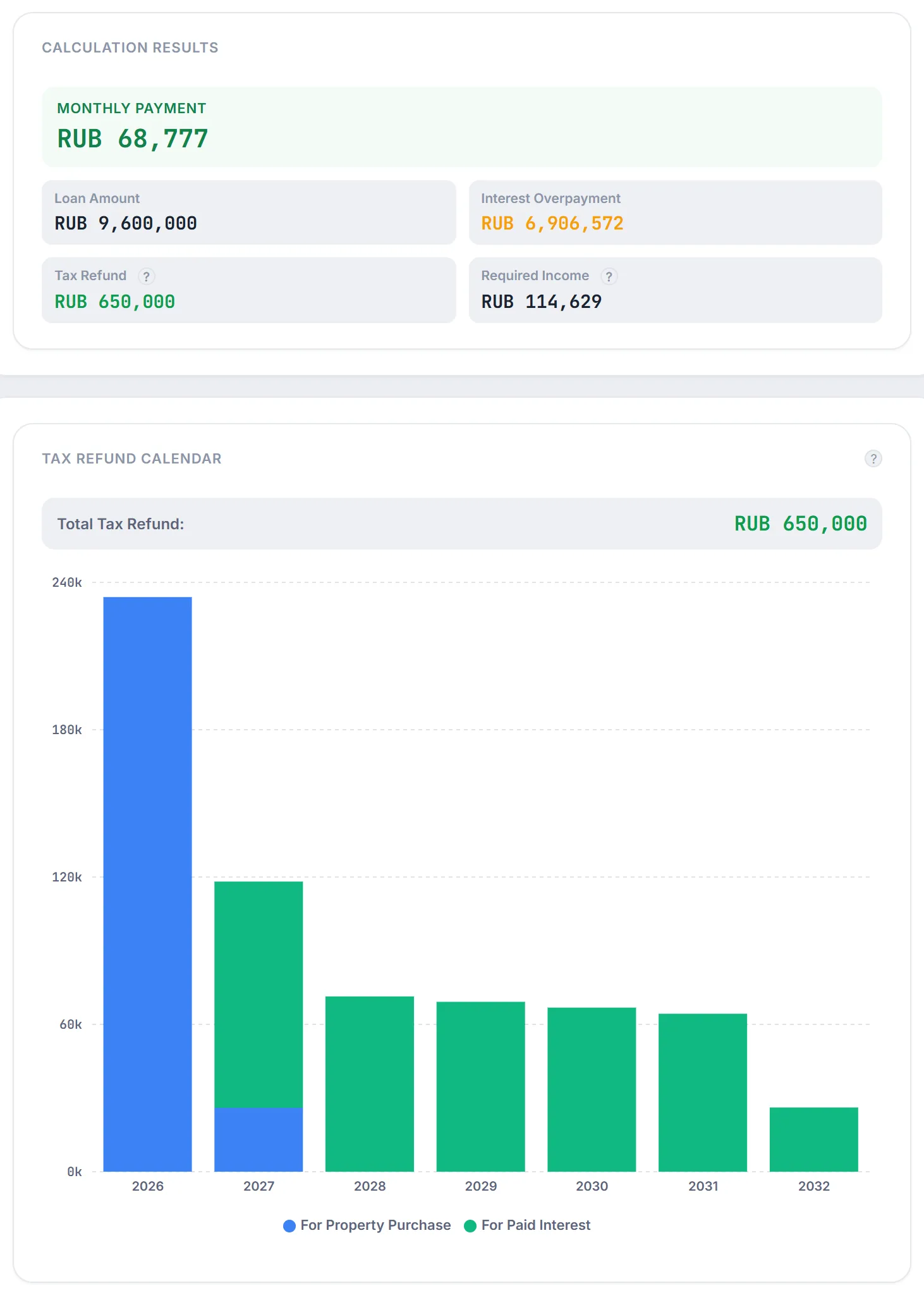
The loan amount equals the property value minus the down payment and maternity capital. For an annuity the monthly payment follows the standard formula:
where $S$ is the loan amount, $r$ the annual rate and $n$ the term in months. In the differentiated scheme the same share of debt $S/n$ is repaid every month plus interest on the balance, so the block shows a range “from … to …” — from the first payment to the last.
The Calculation Results block shows:
- Monthly Payment, Loan Amount and Interest Overpayment — total interest over the term (including early repayments, if you added any);
- Tax Refund — the maximum you can get back on this mortgage (see the tax refund section);
- Required Income — the income at which the first payment takes no more than 60% of the budget:
Example from the screenshot. A RUB 9.6 million loan for 20 years at 6%: $i = 0.5\%$, $n = 240$, payment ≈ RUB 68,777, interest overpayment ≈ RUB 6.9 million, required income $68{,}777 / 0.6 \approx 114{,}629$ roubles.
Below are the Shares Chart (principal versus interest) and the Payment Schedule with Chart and Table tabs. The table is grouped by year and shows the payment, principal, interest and remaining debt for every month; Show next 12 months and Expand all rows reveal the remaining months, and the Fullscreen icon opens the whole schedule.
5. Early repayments: shorter term or lower payment
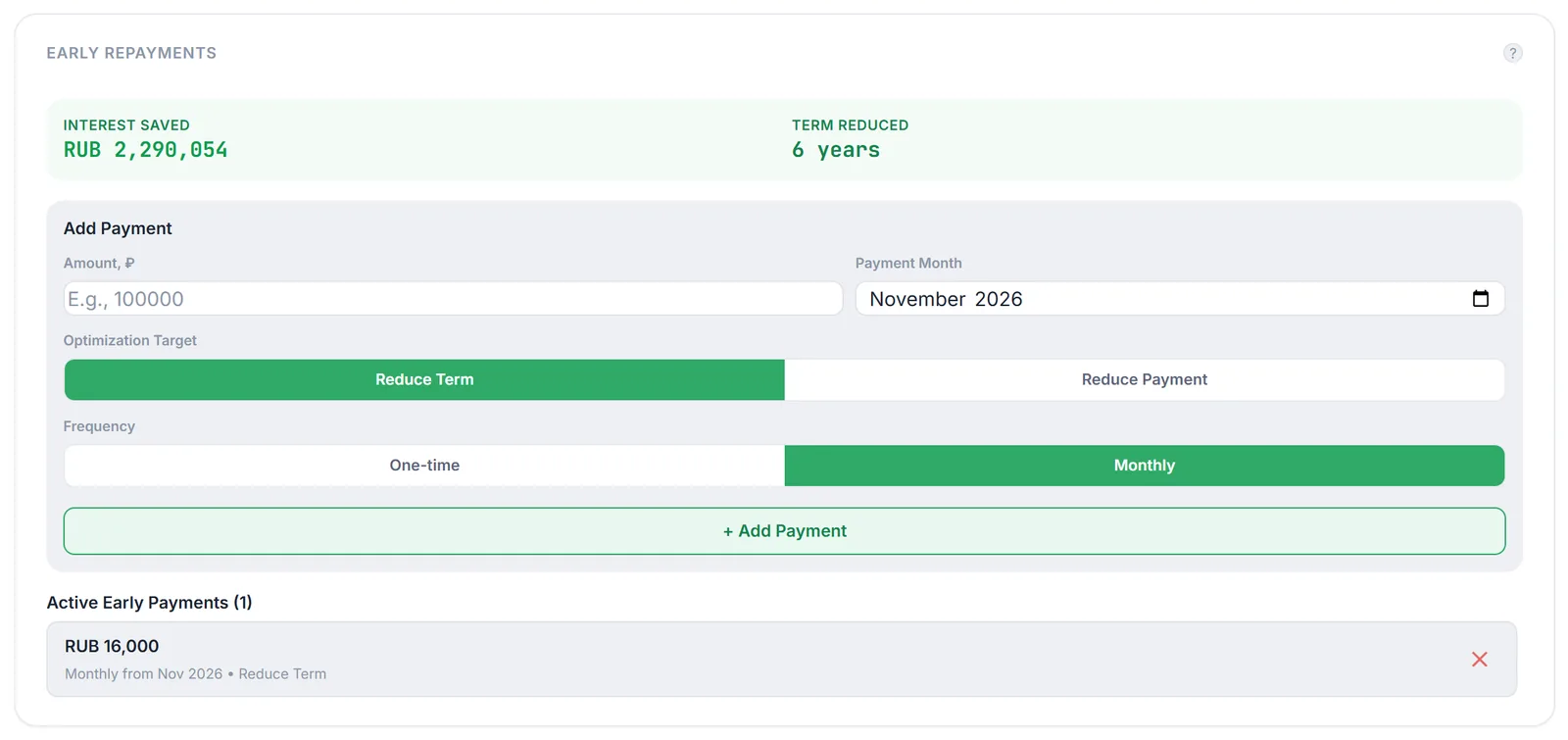
In the Early Repayments block fill in Amount, ₽, Payment Month, Optimization Target and Frequency, then click Add Payment.
- One-time — a single payment in the chosen month; Monthly — the same amount every month starting from the chosen one.
- Reduce Term — the monthly payment stays the same and the loan is closed earlier.
- Reduce Payment — after the early payment the instalment is recalculated over the remaining term (for an annuity by the same formula, for the differentiated scheme as a new monthly share of debt).
The early amount is applied in the chosen month after the regular payment and reduces the outstanding debt; if it exceeds the balance, only the balance is repaid. At the top of the block Firewire compares the schedule with and without early payments: Interest Saved — how much less interest you pay, Term Reduced — how many months earlier the loan is closed. With Reduce Payment the term does not shrink; only the savings grow.
Example from the screenshot. RUB 16,000 a month is added to the RUB 9.6 million loan from November 2026 with term reduction: interest saved RUB 2,290,054, and the loan closes 6 years earlier.
Added payments appear in Active Early Payments; remove an unwanted one with the cross.
6. Tax refund calendar
Firewire models two Russian property tax deductions: 13% of the property value, but on no more than RUB 2 million (up to RUB 260,000), and 13% of the interest paid to the bank, but on no more than RUB 3 million (up to RUB 390,000). The Tax Refund value in the results is the theoretical maximum:
where $C$ is the property value and $I$ is all interest in the schedule. In total this is no more than RUB 650,000.
The Tax Refund Calendar spreads the refund over years. You cannot get back more than the tax you paid in a year, so the annual limit is derived from the Investor Income field:
The property refund goes into each year’s limit first until RUB 260,000 is used up, then the interest refund: 13% of interest accumulated by that year (on no more than RUB 3 million) minus what has already been claimed. Bars are coloured by type (“For Property Purchase” and “For Paid Interest”), and Total Tax Refund is shown on top. In the example an income of RUB 150,000 gives an annual limit of RUB 234,000, so the property refund is spread over two years.
Note: the calendar places a refund in the year the interest was paid, while in reality the money comes back after you file a tax return or through your employer. The calculation does not know whether you have claimed a property deduction before, and it uses the full property value even if part of it was paid with maternity capital. If the income field is 0, the calendar is empty and asks you to check the monthly income.
7. Refund reinvestment effect
The Refund Reinvestment Effect block answers the question: what if every refund were immediately invested at your portfolio’s yield? Each annual refund from the calendar compounds until the end of the loan term:
where $V_t$ is the refund for year $t$, $t_0$ the start year, $T$ the actual loan term in years (after early repayments) and $y$ your portfolio’s yield to maturity, capped at 10% as a conservative long-term limit. The block shows Capital at End of Term, Total Refunds (the same maximum as in Calculation Results) and Reinvest. Income — the difference between the capital and that amount.
Note: the footnote under the block prints the portfolio YTM as it is (for example 16.2%), but no more than 10% goes into the calculation. If the portfolio is empty, you see a hint to add assets instead of the result.
8. Debt load and payment cover by the portfolio
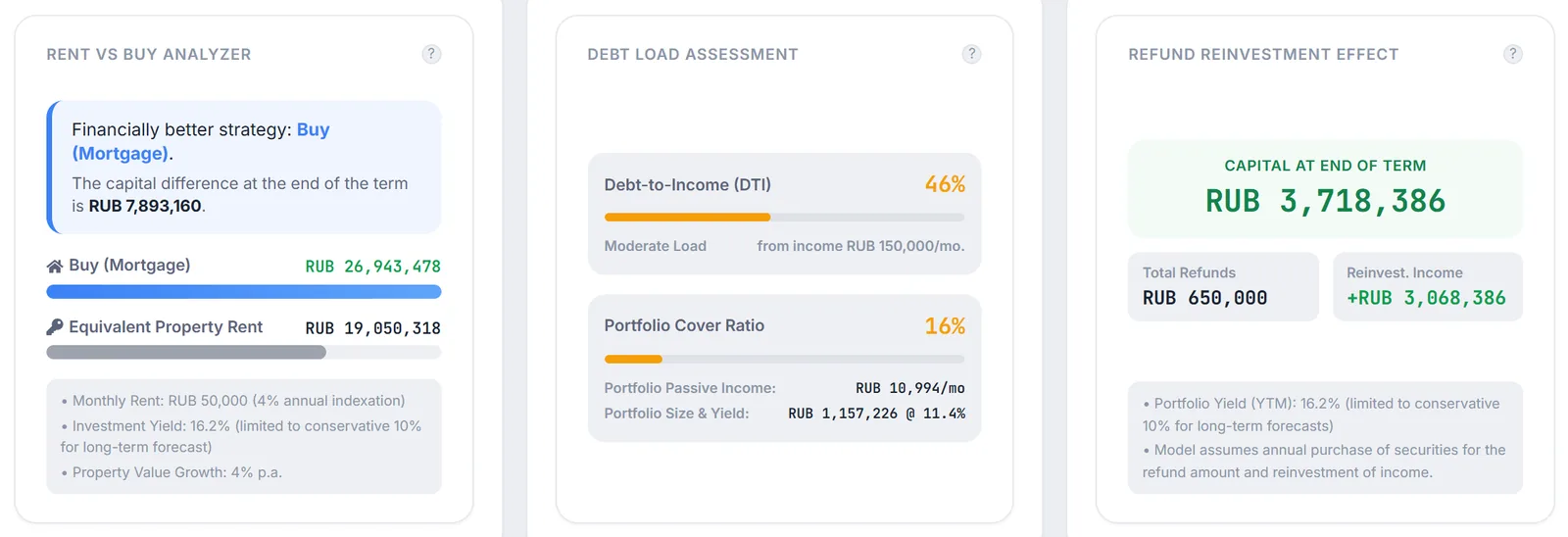
The Debt Load Assessment block has two gauges.
- Debt-to-Income (DTI) — the share of the first payment in monthly income: $\text{DTI} = P_1 / \text{income}$. Up to 30% is “Low Load (Safe)”, 31–50% is “Moderate Load”, above 50% is “Critical Load (High Risk)”.
- Portfolio Cover Ratio — how much of the payment the portfolio’s passive income would cover: the portfolio value is multiplied by the current coupon yield of its bonds, divided by 12 and then by the first payment. Below the gauge you see “Portfolio Passive Income” per month and “Portfolio Size & Yield”.
Example from the screenshot. A RUB 68,777 payment on RUB 150,000 income gives DTI 46%, moderate load. A RUB 1,157,226 portfolio at a current yield of 11.4% produces about RUB 10,994 a month — 16% of the payment.
9. Rent or buy
The Rent vs Buy Analyzer compares capital at the end of the actual loan term in two scenarios.
- Buy (Mortgage) — the flat appreciates by 4% a year, and the refunds from the calendar are added to its value: $C \cdot 1.04^{T} + \sum V_t$.
- Equivalent Property Rent — you do not buy, you invest the down payment and every month add the difference between the mortgage payment and the rent. Rent rises by 4% a year, capital grows at the portfolio yield capped at 10%:
where $P_m$ is the mortgage payment in month $m$ (including early payments) and $R$ the rent in the first month. If rent exceeds the payment, the difference is subtracted from capital. The Financially better strategy verdict shows the scenario with more capital and the gap between them.
Example from the screenshot. A RUB 12 million flat is worth about RUB 26.3 million after 20 years at 4% growth, RUB 26,943,478 with refunds. Renting at RUB 50,000 yields RUB 19,050,318 — buying wins by RUB 7,893,160.
10. Caveats and limitations
- A model, not a bank contract. Insurance, fees, rate changes, property tax, repairs and tax on investment income are not included.
- Fixed assumptions. Property and rent growth are 4% a year and investment yield is capped at 10%; they cannot be changed.
- Maternity capital reduces the loan, but is not part of the starting capital in the rent scenario and does not reduce the deduction base.
- A non-empty portfolio is required. Without assets, “Refund Reinvestment Effect” and “Rent vs Buy Analyzer” show a hint instead of a result.
- Plan. The section is not limited by plan — it is available to every user.
How a mortgage affects the portfolio forecast is covered in reinvestment forecast. The calculations are for reference only and are not individual advice.
11. Frequently asked questions (FAQ)
Why is “Tax Refund” in the results larger than the total in the refund calendar?
“Tax Refund” is the theoretical maximum based on the property value and interest. The calendar additionally caps the refund by the tax you pay in a year (13% of the income entered in the parameters). With a modest income part of the deduction cannot be returned within the loan term.
Which is better in the calculator — Reduce Term or Reduce Payment?
For the same early payments “Reduce Term” usually gives larger “Interest Saved” because the debt is repaid faster while the payment does not fall. “Reduce Payment” lowers the monthly burden. Add both variants to separate mortgages via “Add Mortgage” and compare.
Are my mortgages available on another device?
Yes: mortgage parameters and early payments are saved in your profile settings. Only the set of visible blocks is stored in the browser.
Why is DTI based on the first payment?
For an annuity the payment is constant, and in the differentiated scheme the first payment is the largest — this is what a bank looks at. If an early payment is scheduled in the first month, it is included too.