

Dashboard Widgets: Asset Profitability, Top Traded Assets and More
A guide to dashboard widgets that had no article before: Asset Profitability with the portfolio’s leaders and laggards, Top Traded Assets over 30 days and eight more cards — from the yields trio to cash flow from trades.
- Add: Configure → Add widget → name from the catalogue.
- Asset Profitability: leaders and laggards by unrealized P/L, “%” or “₽”, “Asset limits”, Alt pins the tooltip, a click opens the security.
- Top Traded Assets: the five securities with the highest trade turnover over 30 days.
- Also: all-time yield, upcoming payments, yields trio, top positions, duration, payout statistics, capital flow and asset class turnover.
1. How to add a widget
All widgets in this guide are added to the dashboard the same way: click Configure above the dashboard, then Add widget, find the widget by name in the catalogue and select it. Card size is changed in edit mode; for many widgets the height determines how many rows fit. The grid, edit mode and catalogue are covered in Bento Grid dashboard, and note and asset cards in Note and Asset widgets.
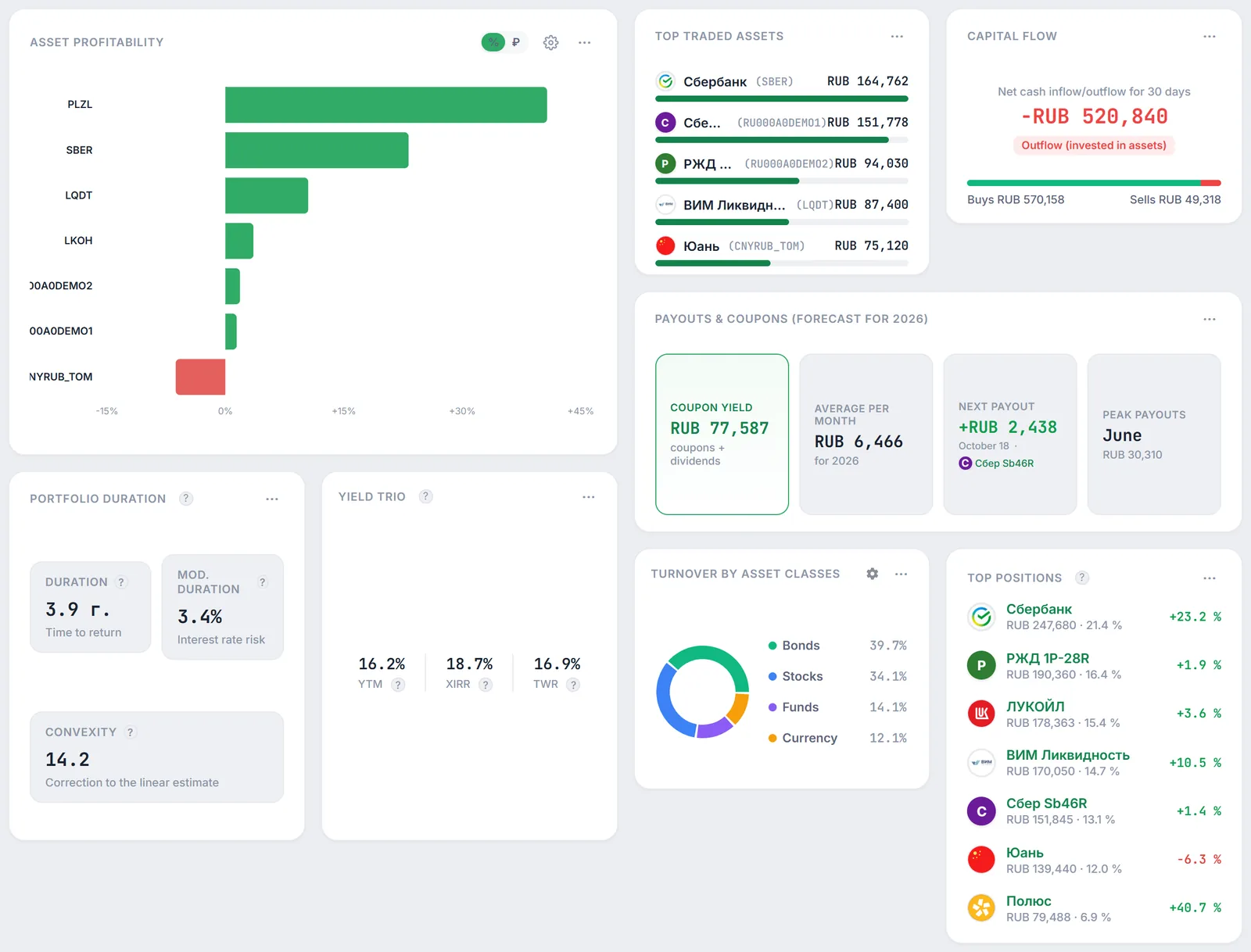
2. Asset Profitability: leaders and laggards
The Asset Profitability widget is a horizontal chart of unrealized profit and loss by security. Securities in profit are at the top from best to worst, securities at a loss at the bottom; green bars are profit, red bars are loss. Tickers are on the left axis.
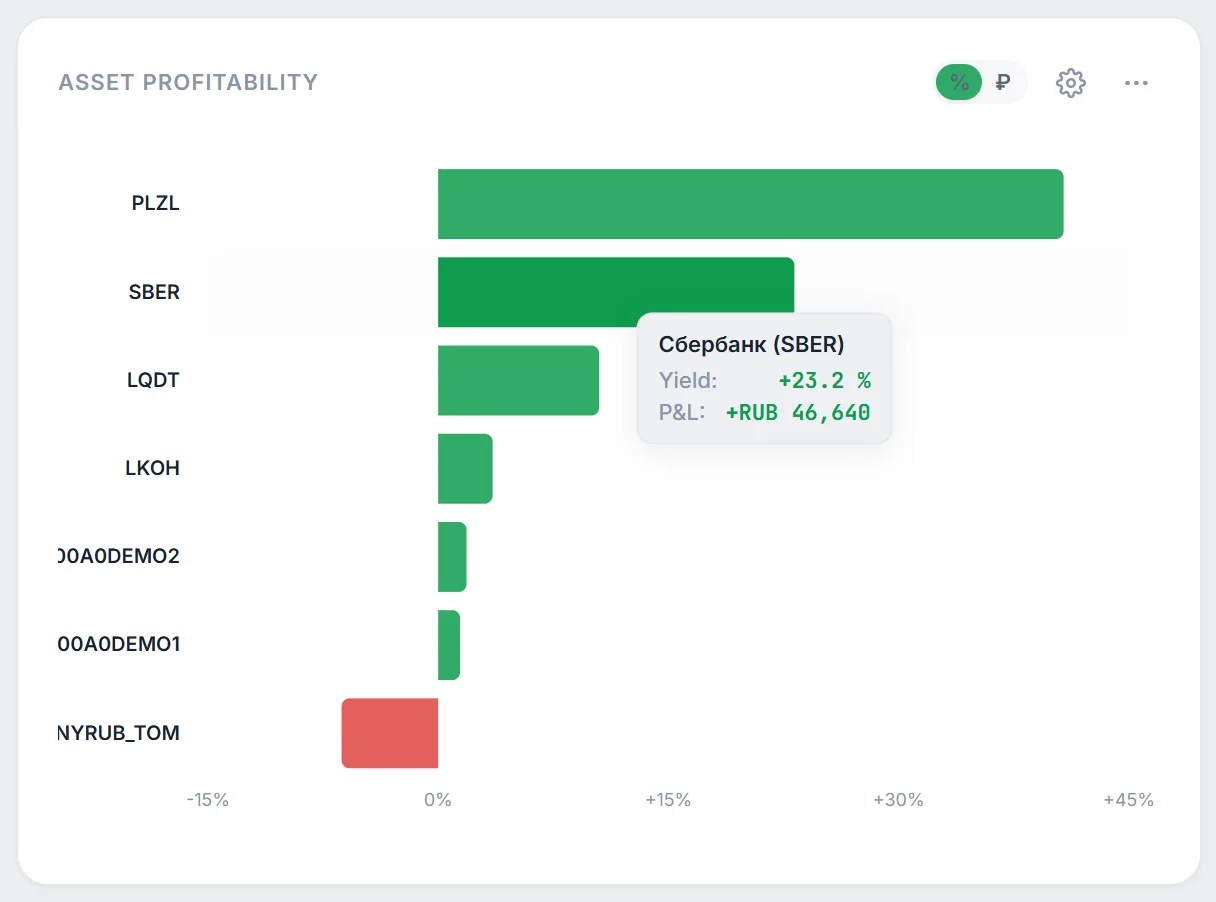
- “%” / “₽” — unit switch: percent of the amount invested or profit in roubles. In hidden-amounts mode the widget shows percent only, the switch is disabled and the tooltip has no roubles.
- Tooltip on hovering a bar — name and ticker, “Yield:” in percent and “P&L:” in roubles. Hold Alt to pin the tooltip while the key is pressed.
- Clicking a bar or a ticker opens the security page.
- The gear opens “Asset limits”: how many securities to show under “Profitable (+):” and “Unprofitable (-):” — “Auto”, 1, 2, 3, 5, 10 or “All”.
In “Auto” mode the number of securities depends on the card height: 2 at ¼ height, 5 at ½, 8 at ¾ and 12 at full height. Half (rounded down) goes to leaders and the rest to laggards: at ½ height, for example, the 2 best and the 3 worst. If fewer securities are at a loss than there are slots, all of them are shown.
Note: the chosen limits are stored in the browser and apply to every Asset Profitability widget in that browser; on another device they are back to “Auto”. Profitability is unrealized, at current prices.
3. Top Traded Assets
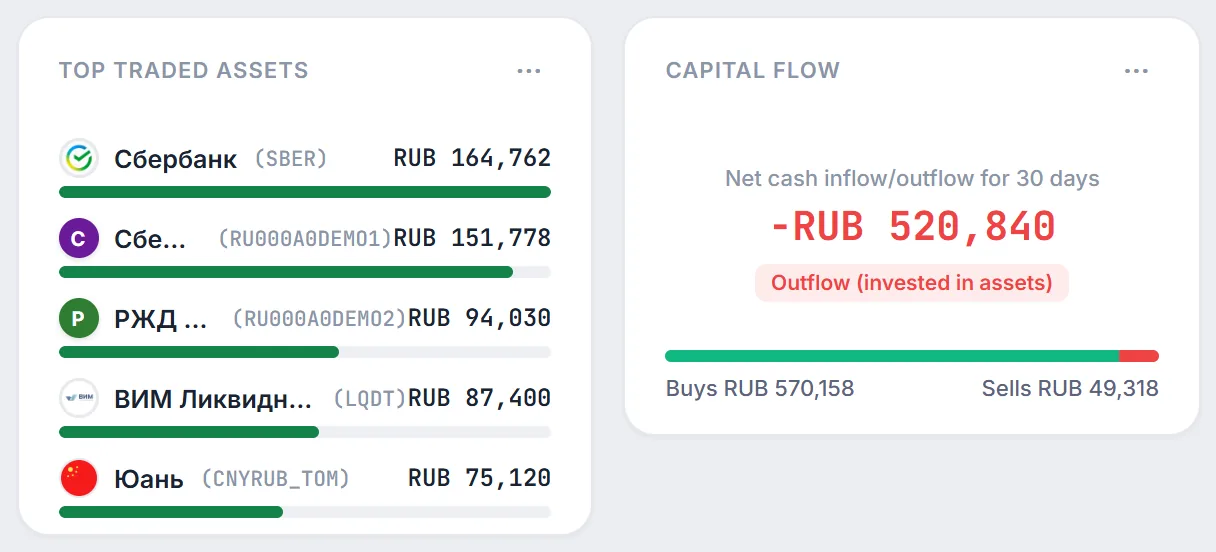
The widget shows the five securities with the highest turnover over the last 30 days. Turnover is the sum of all trades in the security during that period, buys and sells together. Each row shows the name, ticker, turnover and a bar relative to the most traded security.
If there were no trades in 30 days, the widget shows “No data”. Detailed trade analytics are covered in trade analytics.
4. Other widgets
Below are widgets that were not described in the help before. Names are as in the “Add widget” catalogue; where the card’s own title differs, it is given in parentheses.
- All-Time Yield — the portfolio’s overall financial result in roubles and percent. Under the figures there is a mini chart; hovering or tapping a column shows the “P&L composition by positions” — the unrealized result of each security, from largest to smallest. Column colours follow the portfolio structure by asset class and can be customised with the colour button.
- Upcoming Payments — the nearest coupons and dividends from today: 1, 3, 5 or 7 rows depending on card height, with date, security and amount. If “Hide unconfirmed” is on in the Positions page payout block, forecast payouts are hidden here too.
- Yields Trio (card “Yield Trio”) — three key portfolio yields side by side: YTM, XIRR and TWR, each with a tooltip.
- Top Positions — the largest securities by value: 1, 3, 6 or 9 rows depending on height, with value, portfolio share and result in percent; clicking opens the security page.
- Portfolio Duration — three metrics for the bond part: “Duration” in years (time to return), “Mod. duration” in percent (interest rate risk) and “Convexity” (correction to the linear duration estimate). More in duration.
- Payout Statistics (card “Payouts & coupons (forecast for … )”) — coupons and dividends for the current calendar year, “Average per month” (the annual total divided by 12), “Next payout” with date and security and “Peak payouts” — the month with the largest amount.
- Capital Flow from Operations (card “Capital Flow”) — sells minus buys over 30 days: “Cash inflow” if you sold more than you bought, or “Outflow (invested in assets)” otherwise. The bar under the amount shows the buy/sell ratio. Technical REPO trades, swaps and rollovers are excluded.
- Asset Class Turnover (card “Turnover by Asset Classes”) — a donut chart of trade turnover over 30 days by class: bonds, stocks, funds, currency and others, with each class’s share. Class colours can be customised.
Net cash flow over 30 days is:
where $V_k$ is the trade amount. Example from the screenshot: buys RUB 570,158, sells RUB 49,318 — flow −RUB 520,840, “Outflow (invested in assets)”.
5. Caveats
- 30-day window. Top Traded Assets, Capital Flow from Operations and Asset Class Turnover count trades over the last 30 days from today; older trades are not included.
- Technical trades. REPO and swaps are excluded only in Capital Flow from Operations; in Top Traded Assets and Asset Class Turnover such trades, if your broker reports them, are counted as ordinary ones.
- P&L mini chart. Column heights in All-Time Yield are illustrative, and the “P&L composition by positions” list is the current one, the same for every column.
- Unrealized result. Asset Profitability and Top Positions measure profit at current prices without future taxes and fees.
- Plan. The widgets in this guide are not limited by plan; the number of dashboards is covered in multiple dashboards.
6. Frequently asked questions (FAQ)
Why is there no “₽” switch in Asset Profitability?
Most likely hidden-amounts mode is on: the widget then shows percent only, and roubles are not shown even in the tooltip.
How many securities does Asset Profitability show?
By default 2 to 12 depending on card height, split between leaders and laggards (with an odd number, laggards get one more). Set an exact number in “Asset limits” behind the gear.
Why is Top Traded Assets empty?
The widget only counts trades over the last 30 days. If there were none, or the history has not loaded yet, it shows “No data”.
How is Top Positions different from Asset Profitability?
Top Positions sorts securities by value — what weighs most in the portfolio. Asset Profitability sorts by result in percent — which securities earned the most and which drag the portfolio down.