

Compound Interest Calculator: Goals, Horizon and the Power of Regular Deposits
The Compound Interest calculator models capital growth with regular deposits, tax and inflation in three modes — final total, deposit for a goal and time to the goal — and shows what affects the result the most.
- Where: Calculators → Compound Interest.
- Modes: “Final Total”, “Target Goal” (finds the deposit) and “Years Horizon” (up to 80 years).
- Defaults: return 10.5% (MCFTRN), tax 13%, inflation 7.2% (Rosstat CPI), all editable.
- Also: impact factors, a yearly table with “Download CSV” and a link with all parameters.
1. Why use the calculator
Compound interest works quietly: in the first years capital grows almost only through contributions, and later income starts earning income of its own. The calculator shows how much you will have at the end of the term, what part of it the interest itself earned, how much tax and inflation take away — and what moves the result the most: the term, the yield or the size of contributions.
The calculator is not linked to your portfolio: you set every parameter yourself, so it is handy for testing any scenario — from a first safety cushion to retirement capital.
2. Where to find it
- In the sidebar open the Calculators group → Compound Interest (address
/calculators/compound). - Above the blocks choose a mode: Final Total, Target Goal or Years Horizon.
- The Customize button lets you rearrange, resize and hide the page blocks.
3. Three calculation modes
- Final Total — you set the initial capital, term and contribution, and the calculator computes capital at the end of the term. The main block is titled “Final Total” and also shows In today’s prices and Net income — income after tax.
- Target Goal — you set the Target Goal Amount and the term, and the calculator finds the contribution: the “Required monthly deposit” block. It uses bisection — 30 steps between zero and the target amount — and rounds the result to a rouble.
- Years Horizon — you set the goal and the contribution, the calculator tries terms from 1 to 80 years and shows the first whole year in which capital reaches the goal (“Years needed to save”).
If the initial capital already exceeds the goal, both goal modes say “Your current capital already exceeds the target!”. With “Show in real money” on, the goal is compared with capital in today’s prices.
Note: the contribution found refers to one contribution of the selected frequency — with “Quarterly” it is the amount per quarter, even though the block says “monthly”. And if the goal is not reached even in 80 years, Years Horizon does not warn you and shows a wrong term — check the contribution and the yield.
4. Parameters and default values
The Investor Parameters block contains the fields:
- Initial Capital — money already invested (quick buttons from 0 to RUB 10 million); default RUB 13,800,000.
- Term (years) — 1 to 50 years; default 10. In Years Horizon mode the term is computed rather than entered.
- Regular Deposit — default RUB 30,000; computed in Target Goal mode.
- Deposit Frequency and Compounding Frequency — “Monthly”, “Quarterly” or “Yearly”; both monthly by default.
- Expected Return — default 10.5% a year; the field tooltip refers to the Moscow Exchange Total Return Index (MCFTRN).
- Tax Rate — personal income tax on investment income, default 13%.
- Personal Inflation — default 7.2%: according to the tooltip, the geometric average of Rosstat CPI.
- Show in real money — converts the result into the purchasing power of today’s roubles.
The defaults are built into the calculator and are not taken from your portfolio. If you opened the calculator from a link with parameters, the fields are filled from the link.
5. How capital growth is calculated
The calculator simulates every month. In a contribution month the deposit $D$ is added to the balance (every month for monthly deposits, in months 3, 6, 9 and 12 for quarterly ones, in month 12 for annual ones). In a compounding month income is accrued at rate $r/k$, where $k$ is the number of compounding periods per year, and tax $\tau$ is withheld immediately:
With monthly deposits and compounding this reduces to the familiar recurrence:
The real value at the end of year $t$ is the nominal value discounted by inflation $\pi$:
Default example. RUB 13.8 million, RUB 30,000 a month, 10.5%, 13% tax: in the first year RUB 1,532,292 of income accrues, of which RUB 199,198 is tax; the year ends at RUB 15,493,094, in today’s prices $15{,}493{,}094 / 1.072 \approx 14{,}452{,}513$ roubles. After 10 years — RUB 40,179,517 in nominal terms.
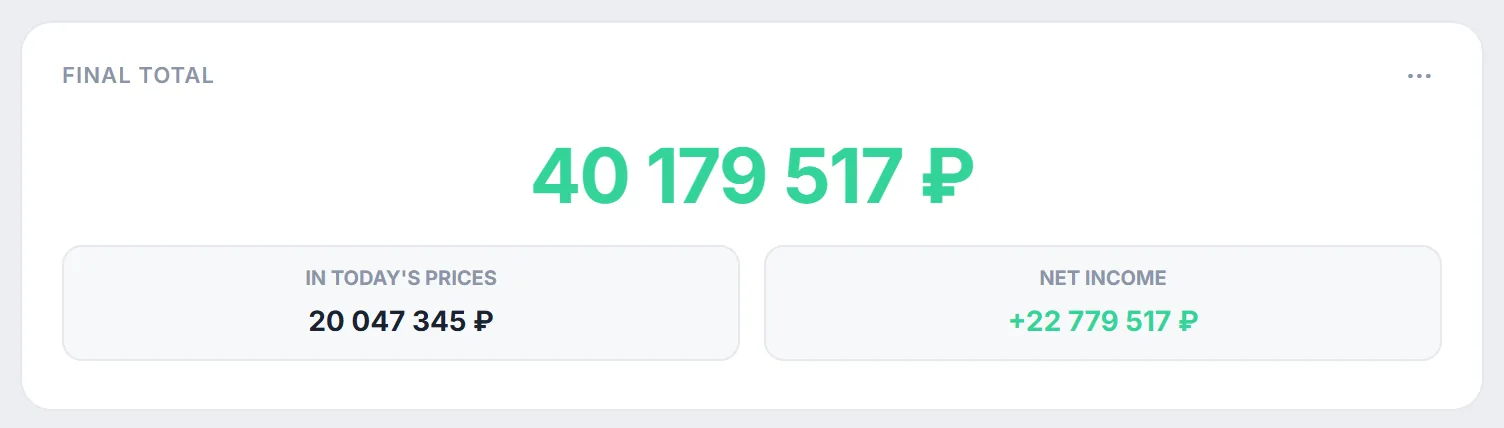
The Capital Structure block splits the result into “Initial Capital”, “Deposits” and “Investment Income” (after tax) and shows what percentage of the final capital “was generated by compound interest” — the share of net income in the nominal total. Note: the “In today’s prices” tile differs from the total only when “Show in real money” is on, and with that switch the “Total” line in Capital Structure also shows today’s prices — it no longer equals the sum of the three parts.
6. Analytical impact factors
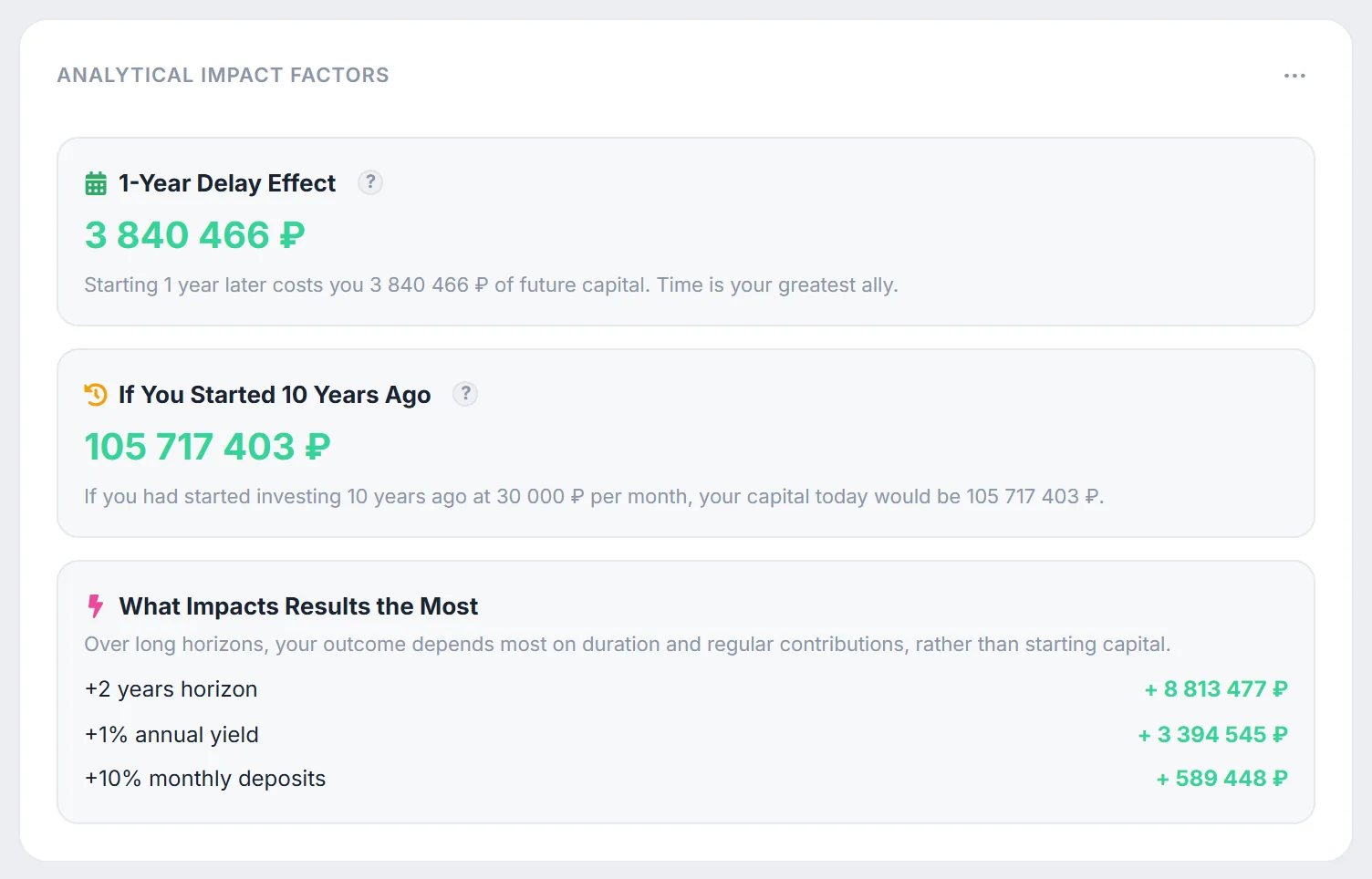
The Analytical Impact Factors block recalculates your scenario with one parameter changed:
- 1-Year Delay Effect — how much smaller the total is if the same plan runs one year shorter (term minus one year, which also loses a year of growth on the initial capital).
- If You Started 10 Years Ago — the result of a scenario that runs 10 years longer with the same contributions and yield: what you would have at the end of your term had you started ten years earlier.
- What Impacts Results the Most — the gain from three separate changes: +2 years horizon, +1% annual yield and +10% monthly deposits.
Default example. A year of delay costs RUB 3,840,466, and the 20-year scenario gives RUB 105,717,403. Two more years add RUB 8,813,477, one percentage point of yield adds RUB 3,394,545, while ten percent more in deposits adds only RUB 589,448: with a large starting capital contributions matter little. Set the initial capital to zero and the picture changes.
7. Growth table and CSV export
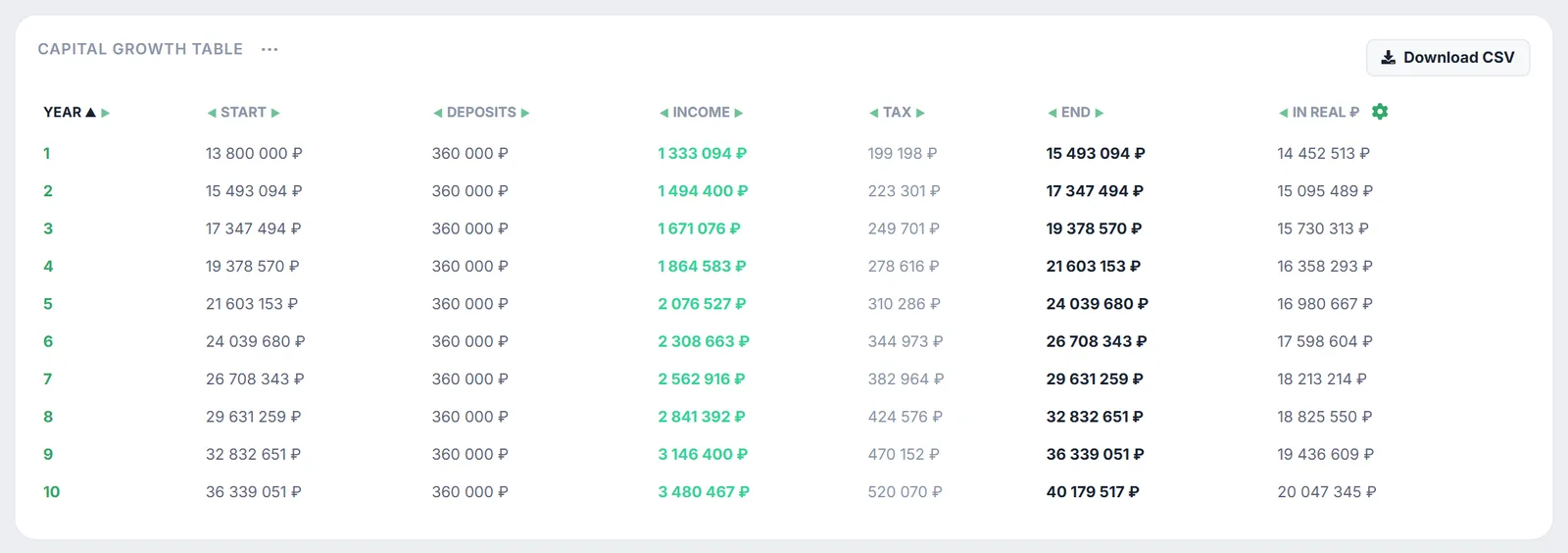
The Capital Growth Table shows every year: “Year”, “Start”, “Deposits”, “Income” (after tax), “Tax”, “End” and “In real ₽”. Click a header to sort; columns can be moved with the arrows and hidden via the gear.
Download CSV saves compound_interest_schedule.csv: all seven columns in their original order, rows in the table’s current sort order, semicolon separator, UTF-8 with BOM so the file opens in Excel without garbled characters.
8. Link with parameters and embedding
The copy-link button next to Embed puts the calculator address with all parameters on the clipboard: mode, initial capital, term, contribution, yield, tax, inflation, goal and both frequencies. The “Show in real money” switch is not included in the link. The calculator page opens after signing in to Firewire, so the recipient needs an account.
For your own website or blog there is the Embed button — it provides the code of a calculator widget that opens without signing in.
9. Caveats
- Constant yield. The calculator does not model drawdowns or year-to-year dispersion — for that there is Monte Carlo simulation in the Capital Forecast calculator.
- Tax every period. Tax is withheld at every compounding, like on coupons; IIS and LDV benefits are not considered.
- Whole years only. The term and the Years Horizon result are in whole years.
- Plan. The calculator is available on any plan.
How inflation turns a nominal return into a real one is explained in real return, and how much you need to live off your capital — in financial freedom (FIRE).
10. Frequently asked questions (FAQ)
Why does “In today’s prices” equal the final total?
Because “Show in real money” is off. Turn it on and the tile shows the total discounted by Personal Inflation. The “In real ₽” column in the table is always calculated.
Where do the 10.5% return and 7.2% inflation come from?
They are defaults built into the calculator: the field tooltips refer to the Moscow Exchange Total Return Index (MCFTRN) and to the geometric average of Rosstat CPI. Change them for your scenario — they are not linked to your portfolio.
What is the difference between compounding frequency and deposit frequency?
Deposit frequency is how often you add money. Compounding frequency is how often accrued income is added to capital and starts earning itself. With the same annual rate, more frequent compounding gives a slightly larger result.
Are my parameters saved?
No: when you open the calculator again it fills in the defaults. To return to your scenario, save the link from the copy-link button.