

Financial Reports by Month and Year
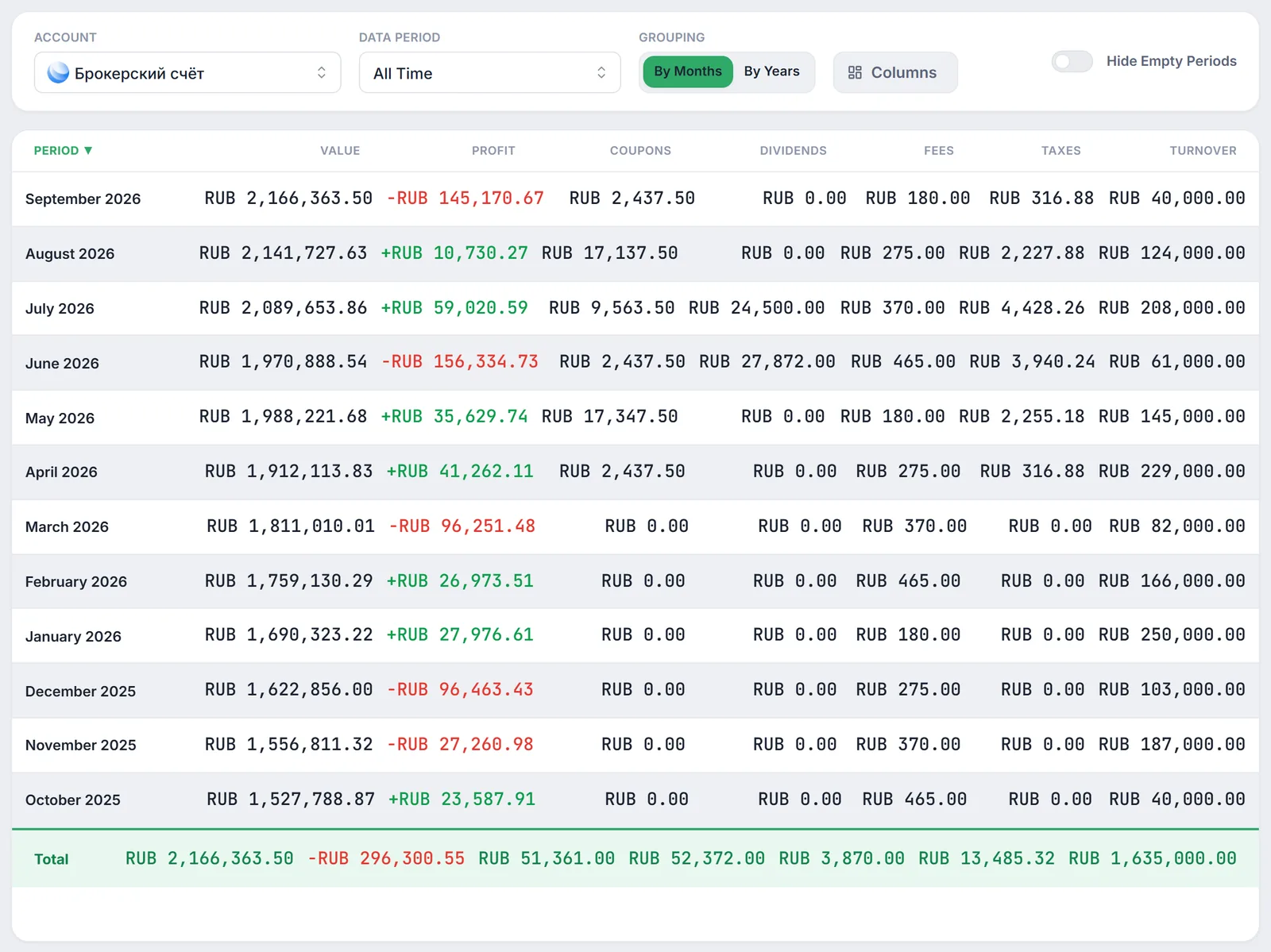
The Reports section puts the key facts about your portfolio for every month or year into one table: what it was worth, how much the holdings were revalued, how much came in as coupons and dividends, how much went to broker fees and tax, and what your trading turnover was. A Total row sits at the bottom, and the whole table can be exported to CSV.
- Seven metrics per period: value, profit, coupons, dividends, fees, taxes and turnover — by months or by years.
- Filters: "Account", "Data Period", "Grouping", column picker and the "Hide Empty Periods" switch.
- Totals: the Total row adds up flows for the selected period and takes the value at the end of the latest period.
- Export: "Export to CSV" saves exactly what you see in the table, including the Total row.
1. Why use financial reports
The dashboard answers "where is my portfolio now"; reports answer "what happened month by month". Reports make it easy to:
- spot the months with the most coupon and dividend income — and the months with none;
- see how much you paid your broker in fees over a year and how much the estimated tax on coupons and dividends came to;
- compare years by profit, passive income and turnover;
- take the numbers into Excel or Google Sheets for your own records.
2. Where to find reports
Choose "Reports" in the app's left-hand menu (page address /reports). The page is titled "Financial Reports". The question-mark button next to the title replays the guided tour of the page.
3. Filters: account, period and grouping
The control panel above the table includes:
- "Account" — the account the report is built for. When you open the page, the account selected in the app header is used.
- "Data Period" — "All Time", "Last 3 Months", "Last 6 Months", "Last 12 Months", "Year to Date (YTD)" and every calendar year with data (for example, "Year 2025").
- "Grouping" — "By Months" or "By Years".
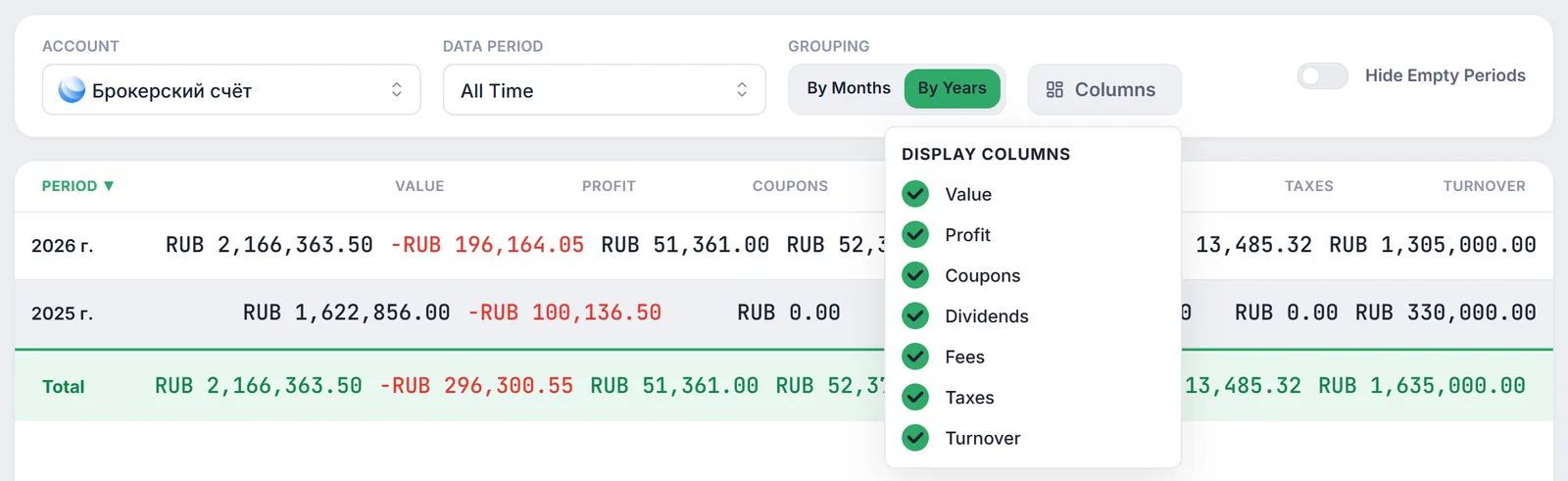
- "Columns" — the "Display Columns" list: untick a column and it disappears from both the table and the CSV.
- "Hide Empty Periods" — hides months where profit, coupons, dividends, fees, taxes and turnover are all zero (value is not taken into account).
Click a column header to sort; click again to reverse the order (▲ / ▼). By default, the most recent periods are on top. Reports cover periods up to and including the current month — future months are not shown.
4. What the columns mean
All amounts are in rubles. For each month Firewire calculates:
| Column | What it shows |
|---|---|
| "Value" | Portfolio valuation on the last date of the month that has a valuation. If a month has no valuations, the last known value is carried forward. |
| "Profit" | How much the gap between the market valuation of your holdings and their book value changed during the month — i.e. revaluation. Deposits and purchases are not profit in themselves; coupons and dividends have their own columns. |
| "Coupons" | Coupons with the "paid" status whose payment date falls in the month. |
| "Dividends" | Dividends paid with a date in the month. |
| "Fees" | Total commissions on all trades in the month. |
| "Taxes" | Estimated personal income tax on the month's coupons and dividends (see below). This is Firewire's estimate, not the amount your broker withheld. |
| "Turnover" | The total amount of all trades in the month — both buys and sells. |
Profit for month $m$ is the difference between the accumulated result of your holdings at the end of the month and at the end of the previous month with a valuation:
where $V$ is the market valuation of holdings and $B$ is their book value. For the first month of history, $P_m$ itself is used.
Tax is calculated on income accumulated over the calendar year: the month's income $I_m$ (coupons + dividends) is added to the income $B_m$ of earlier months of the same year, and the column shows the difference in tax:
Reports use a two-tier 13% / 15% scale. To learn more about tax on coupons and dividends, see Tax Cash Flow Accounting.
5. The Total row and yearly grouping
The Total row at the bottom covers all rows currently visible (after "Data Period" and "Hide Empty Periods" are applied):
- profit, coupons, dividends, fees, taxes and turnover are added up;
- value is not summed — the value of the latest period is used.
"By Years" works the same way: monthly flows within a year are summed, and "Value" shows the valuation at the end of the year's latest month with data. For the current year, that is the value for the current month.
6. Export to CSV
The "Export to CSV" button in the top right corner saves a file named Firewire_Financial_Report_YYYY-MM-DD.csv:
- the file contains only enabled columns and visible rows, in the same order as on screen, plus the Total row;
- column headers include units: "Portfolio Value, ₽", "Profit for Period, ₽", "Coupons, ₽" and so on;
- amounts are rounded to whole rubles, the separator is a semicolon and the encoding is UTF-8 with BOM, so Cyrillic text opens correctly in Excel with a double-click.
If the table has no rows, the button is disabled. Other export options are covered in exporting reports.
7. Caveats and limitations
- Currency. Coupons, dividends, fees and turnover in foreign currency are converted to rubles at the current Central Bank rate, not the rate on the transaction date. For older foreign-currency transactions, amounts may differ from your broker statement.
- Tax is an estimate. The "Taxes" column covers only coupons and dividends; it excludes tax on selling securities, IIS benefits and the long-term holding exemption. Check your broker statement for the amount actually withheld.
- Profit means revaluation. The column shows the change in the paper result of open holdings. For a full breakdown of where the result came from, see PnL decomposition.
- Settings live in the browser. Your grouping and column choices are remembered in this browser. "Data Period" resets to "All Time" after a page reload.
- Completeness of history. Reports are built from the valuations, trades and payouts Firewire has. If history was not loaded from the day the account was opened, early months will be incomplete.
8. Frequently Asked Questions (FAQ)
Why is the value in the Total row not the sum of the rows?
Value is a balance at a point in time, not a flow, so it cannot be added up. The Total row shows the value at the end of the latest visible period. All other columns are flows and are summed.
Will the "Taxes" column match what my broker withheld?
Not necessarily. Firewire estimates personal income tax on coupons and dividends using the 13% / 15% scale on income accumulated over the year. Tax on selling securities, IIS benefits and the specifics of taxing foreign securities are not included.
Why does a month have a value but zero profit?
If there is no portfolio valuation in a month, Firewire carries forward the last known value and treats profit for that month as zero. To hide such rows, turn on "Hide Empty Periods".
Can I export only fees and turnover?
Yes. In the "Columns" menu, keep only "Fees" and "Turnover" ticked and click "Export to CSV" — the file will contain the period, these two columns and the Total row. See also commission statistics.