

Forecast: Reinvestment vs Simple Return
The "Reinvestment vs Simple Return" block shows how your portfolio grows if you put income back into the market, and how much you forgo if you spend it. Model settings cover tax, IIS-3, broker commission, a benchmark and mortgage payments.
- Two lines: Reinvest (income keeps working) and Simple (income just accumulates), starting from the current portfolio value.
- Horizon: to the maturity of the longest bond, but at least 8 years.
- Settings: NDFL 0/13/15%, IIS-3 benefit from year 5, commission, custom reinvestment rate, RGBITR/RUABITR benchmark.
- Mortgage: the "Include Mortgage" switch subtracts payments and shows the lost profit.
1. What the forecast shows
Coupons and dividends can be spent or put back into the market. The "Reinvestment vs Simple Return" block on the Yields page draws two trajectories of portfolio value for years ahead: Reinvest, where income is invested back every year, and Simple, where income accumulates but earns nothing itself. The gap between the lines is the price of spending your payouts.
The neighbouring "Financial Modeling Parameters" block brings the forecast closer to your situation: tax, the IIS-3 benefit, broker commission, your own reinvestment rate and a comparison with a bond index. The "Include Mortgage" switch shows what it costs to take money out of the portfolio for loan payments.
How individual coupons are accrued and reinvested month by month is covered in Payout Calendar. This guide is about the annual model of the whole portfolio and its settings.
2. Where to find it
- Open the Yields section in the sidebar.
- Scroll to the "Financial Modeling Parameters" and "Reinvestment vs Simple Return" blocks. If they are missing, click Configure → Add block and choose "Modeling Parameters" and "Growth Forecast".
- The "Include Mortgage" switch sits in the filter bar at the top of the page, next to the "Nominal / Real (− CPI)" and "Simple / Reinvest" toggles.
You can also add widgets with the same names to a dashboard. They are linked to each other and remember their settings in this browser, but they work separately from the Yields page and do not account for mortgages.
3. How the chart works
- Start — the current value of the selected account's portfolio.
- Horizon — from the current year to the maturity year of the longest bond in the portfolio, but at least 8 years.
- Reinvest (solid green line) — income at the reinvestment rate is added to capital every year and then earns on its own.
- Simple (dashed line) — income at the portfolio YTM is added to capital, but no return is earned on it.
- Under the chart is the result: "When reinvesting coupons, the result for N years is higher by … — compound interest effect."
- Hover over a year to see Reinvest, Simple, Benchmark (if enabled) and Difference. The arrows button next to the title expands the chart to full screen.
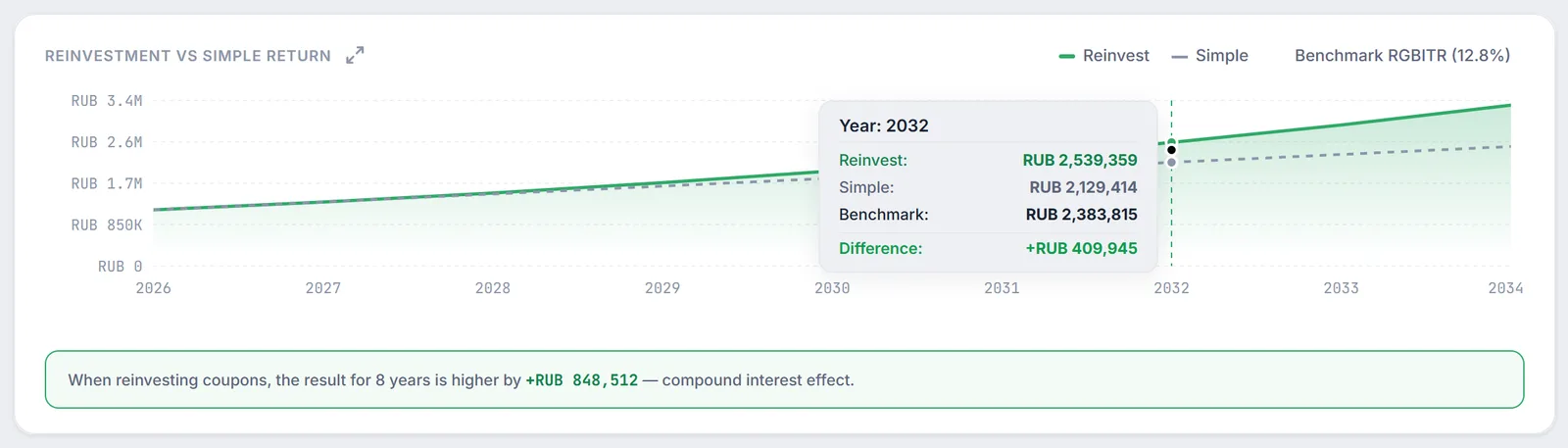
When amounts are hidden, the axis and tooltips switch to percent of the starting value, so you can share the chart without revealing your balance.
4. Model settings
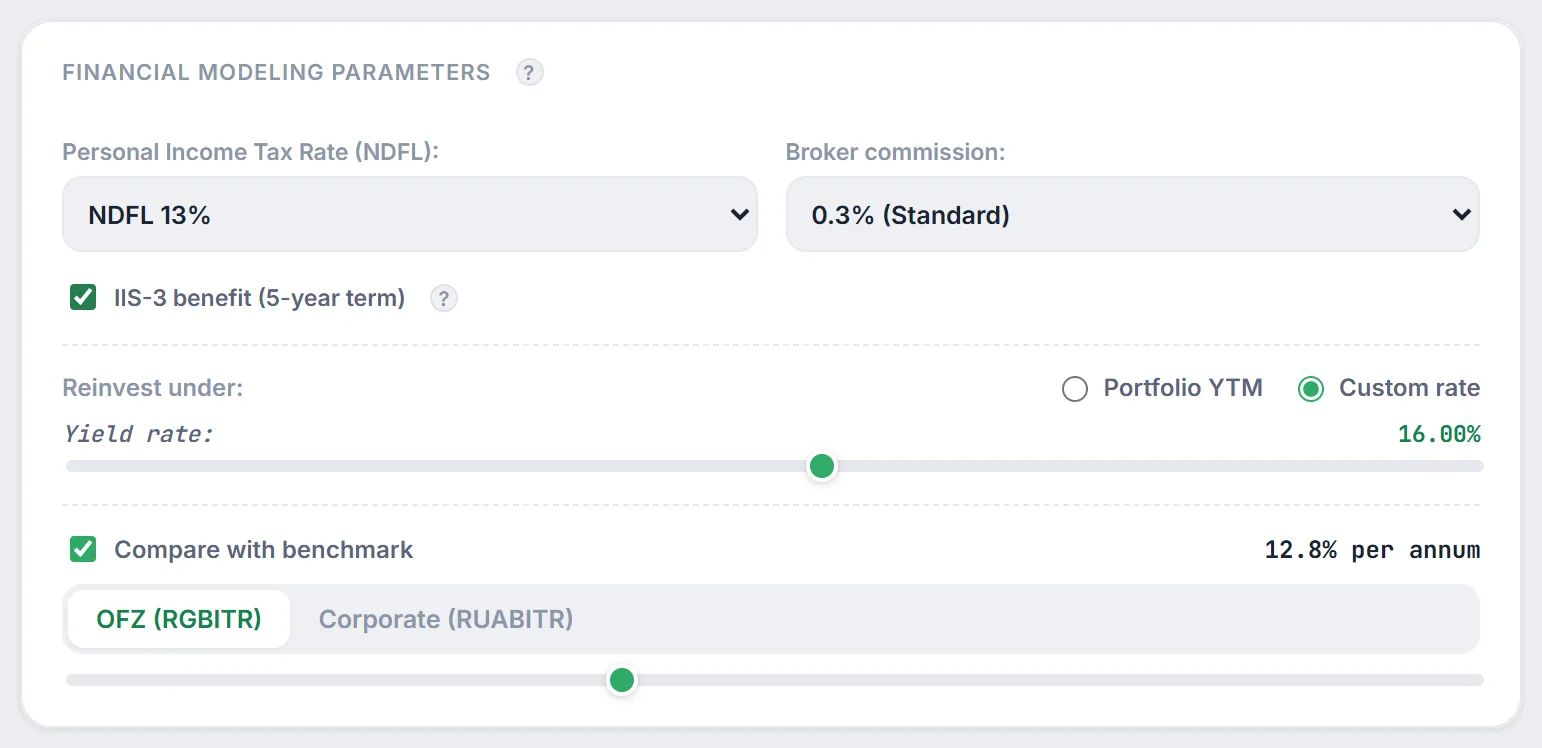
- "Personal Income Tax Rate (NDFL)" — "No tax (0%)", "NDFL 13%" or "NDFL 15%". The model reduces annual income by this share: $r \cdot (1 - \tau)$. The rate is applied to the whole income, without splitting it into brackets.
- "IIS-3 benefit (5-year term)" — this checkbox appears when the tax is above zero. With it, the model sets tax to zero starting from the 5th year of the forecast, and the chart tooltip marks those years with "IIS-3 (0% Tax)". The checkbox is remembered in your browser. IIS-3 rules are covered in IIS and LDV tax benefits.
- "Broker commission" — 0%, 0.05%, 0.3%, 0.5% or 1.0%. The commission reduces the starting amount once, and on the Reinvest line it also proportionally trims each year's income — the model's way of reflecting that reinvesting means new purchases.
- "Reinvest under" — "Portfolio YTM" (default) or "Custom rate" with a slider from 0 to 30% in 0.5 steps. The rate affects only the Reinvest line; Simple is always calculated at the portfolio YTM (what YTM is).
- "Compare with benchmark" — the Moscow Exchange "OFZ (RGBITR)" or "Corporate (RUABITR)" index. Firewire fills in the yield of the selected index, and the slider lets you set your own from 5 to 25% a year. The benchmark grows from the same starting amount at compound interest, without tax or commission; the legend shows "Benchmark RGBITR (…%)" and the tooltip gets a Benchmark row.
How the settings add up in one annual step of the model ($V_0$ — starting value, $f$ — commission, $\tau_i$ — tax in year $i$, $M_i$ — mortgage payments when enabled):
Values never go below zero. Apart from the IIS-3 checkbox, the block settings are not saved: when you open the page again, it is back to NDFL 13%, 0.3% commission and the portfolio YTM rate.
5. The "Include Mortgage" switch
If you track loans in the Mortgages section (the Expenses group in the sidebar), the forecast can reflect that part of your money goes to payments rather than investments.
- Add a mortgage in Mortgages: property value, down payment, maternity capital, rate, term, start date and payment type (annuity or differentiated).
- On the Yields page, turn on "Include Mortgage". The switch and the list of mortgages are saved in your account settings.
- Firewire builds a payment schedule for each mortgage, sums it by calendar year and, starting next year, subtracts it: from the Reinvest line, the payments of that year; from the Simple line, all payments accumulated by that year.
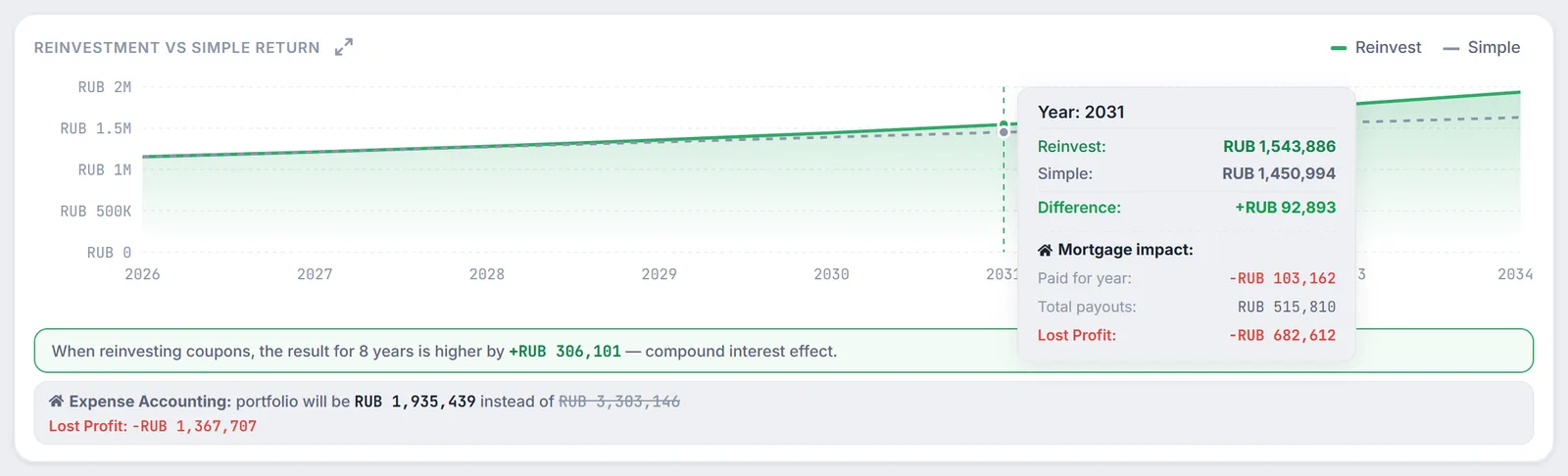
An "Expense Accounting" panel appears under the chart: where the Reinvest line ends up with payments, and where it would be without them (the crossed-out amount). The "Lost Profit" line is the difference: the payments themselves plus the return that money would have earned at compound interest. The chart tooltip for every year has a "Mortgage impact" section with "Paid for year", "Total payouts" and "Lost Profit" to date.
The screenshot shows why lost profit exceeds the payments: by 2031 RUB 515,810 has been paid, but the gap to the no-mortgage forecast is already RUB 682,612. A separate calculator in the Mortgages section helps decide between early repayment and investing.
6. Model limitations
- The rate of return is constant over the whole horizon; price swings, defaults and key rate changes are not modelled (for rate shocks there is the stress test).
- Income accrues once a year, and tax uses a single rate for all income, without the RUB 2.4 million threshold (see cash flow taxation for how the scale works).
- New deposits are not part of the forecast — only current capital and, when enabled, mortgage payments.
- The forecast illustrates the compound interest effect; it is not a promise of returns.
7. Frequently Asked Questions (FAQ)
Why does the Simple line not change when I set a custom reinvestment rate?
By design: Simple is always calculated at the portfolio YTM, while "Custom rate" only sets the return on the income you put back. That way you see what reinvesting at your chosen rate adds.
How do I choose between 13% and 15%?
The 15% rate applies to the part of annual investment income above RUB 2.4 million. If your yearly investment income is well below that, keep 13%. The model applies the chosen rate to all income, so near the threshold the result is approximate.
I turned on "Include Mortgage" but there is no Expense Accounting panel. Why?
The panel appears only if at least one loan has been added in the Mortgages section. Without loans the switch subtracts nothing.
Are the model settings kept if I close the page?
On the Yields page only the IIS-3 checkbox (in your browser) and the "Include Mortgage" switch (in your account settings) are remembered. Everything else resets to defaults. The forecast widgets on a dashboard keep their own settings in the browser.