

Tax Preview: How Much Personal Income Tax You Would Pay if You Sold Everything Today
The Tax Preview widget in Settings estimates the tax your broker would withhold if you sold all open positions at current prices: it offsets unrealized gains and losses and applies the 13/15% NDFL scale.
- Where: Settings → "Connections & Main" tab → "Tax Preview".
- Base: unrealized profit minus loss on open positions, never below zero.
- Tax: 13% up to RUB 2.4 million and 15% on the excess — "Estimated Tax Withholding".
- IIS: for an IIS account you see "RUB 0 (IIA Exemption)"; account type and term are not checked.
1. Why use the tax preview
Until a security is sold, its gain is on paper and no tax is due. But as soon as you sell, your broker withholds personal income tax (NDFL) on the positive result. The "Tax Preview" widget answers the question "how much tax would I pay if I sold everything today": it adds up unrealized gains and losses on open positions, offsets them and applies the NDFL scale.
It helps you gauge the amount before trading, see how much of your gain is already offset by paper losses, and notice when the tax base crosses the higher-rate threshold.
2. Where to find it
- Open Settings in the sidebar.
- Go to the "Connections & Main" tab.
- Find the "Tax Preview" widget. If you hid it, click Configure and bring it back with Add widget.
The calculation uses the account or portfolio selected in the account switcher in the app header, and only visible positions: securities hidden from calculations are left out.
3. What the fields mean
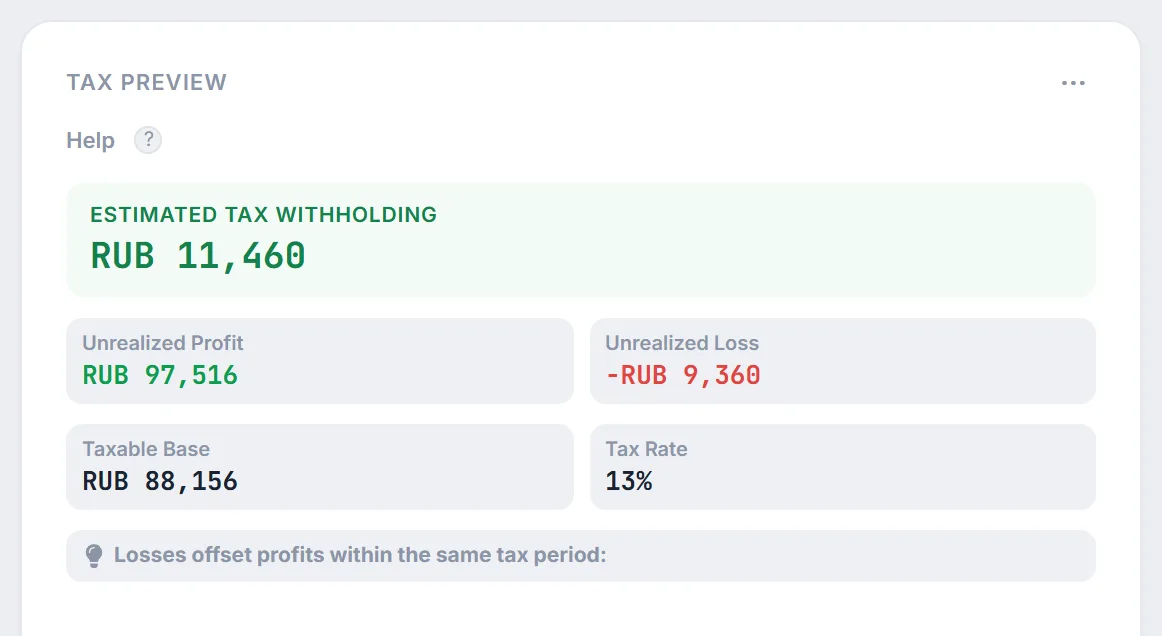
- "Unrealized Profit" — the sum of positive results across all open positions: how much more they are worth now than they cost you.
- "Unrealized Loss" — the sum of negative results on positions that are currently in the red.
- "Taxable Base" — profit minus loss. If losses are larger, the base is zero: it is never negative.
- "Tax Rate" — 13%, or "13% / 15%" if the base exceeds RUB 2.4 million: the higher rate applies only to the part above the threshold.
- "Estimated Tax Withholding" — the NDFL amount the broker would withhold if you sold all positions at current prices.
4. How the tax is calculated
First, gains and losses are offset into a single base:
where $\text{PL}_k$ is the unrealized result of the $k$-th open position (gains positive, losses negative). Then the two-step NDFL scale for investment income is applied:
Example from the screenshot. Profit RUB 97,516, loss −RUB 9,360: base $97{,}516 - 9{,}360 = 88{,}156$ rubles, tax $88{,}156 \times 0.13 \approx 11{,}460$ rubles. Without offsetting, the tax on the profit alone would be about RUB 12,677 — the losing positions save roughly RUB 1,217.
The same scale applies to coupons and dividends in the payout calendar; see cash flow taxation for how the RUB 2.4 million threshold works.
5. When an IIS account is selected
When the account selected in the header is marked as an IIS (individual investment account), the widget shows an "IIA" badge, replaces the tax amount with "RUB 0 (IIA Exemption)" and adds a note about the IIS tax deduction. Profit, loss and the base are still calculated, so you can use them as an estimate.
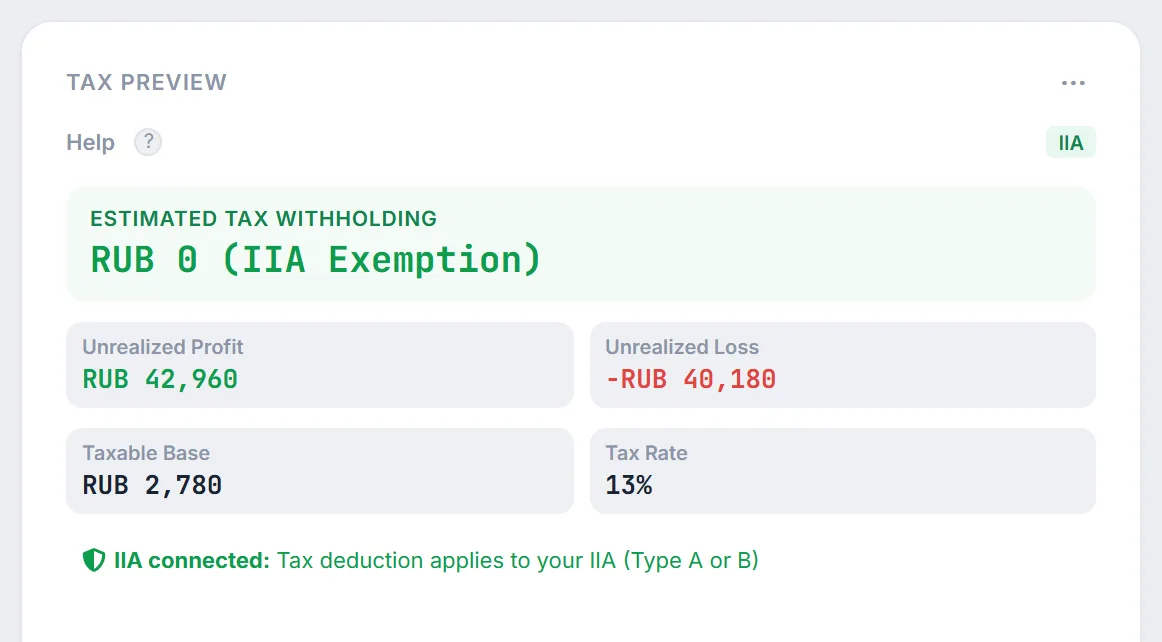
Keep in mind: the widget does not distinguish IIS types and does not check how long the account has been open. On a Type A IIS, tax on income is paid when the account is closed, and the IIS-3 exemption depends on the minimum term. See IIS and LDV tax benefits for the rules that apply to your account.
6. What the widget does not account for
- Trades already closed this year. Only open positions count; gains and losses on securities sold earlier are not in the base.
- Coupons and dividends. Tax on them is withheld separately at payout.
- The long-term ownership benefit (LDV). Securities held for over three years may be tax-exempt, but the widget counts them with everything else (LDV terms per security are covered in IIS and LDV tax benefits).
- Other income and other brokers. The 15% rate depends on all investment income for the year, and losses across brokers are offset through a tax return — the widget only sees the selected account.
- Lot matching and broker commissions. Your broker calculates tax under its own accounting rules, so the actual amount may differ.
The calculation is for reference only and does not replace your broker's report or advice from a tax professional.
7. Frequently Asked Questions (FAQ)
Why is the tax zero even though some securities are in profit?
Either losses on other positions cover the profit and the base came out at zero, or an IIS account is selected in the header — then the widget shows "RUB 0 (IIA Exemption)".
When does the "13% / 15%" rate appear?
When the taxable base exceeds RUB 2.4 million. The first RUB 2.4 million is taxed at 13%, and only the excess at 15%.
Can I see the tax for all accounts at once?
Yes: choose all accounts or your multi-account portfolio in the header. The widget calculates tax on the visible positions of that selection, but remember that different brokers withhold tax separately.
How can I reduce the tax when selling?
The widget shows the effect of offsetting: losing positions reduce the base. Trading decisions are yours — Firewire provides analytics, not individual recommendations.