

Bond Maturity Calendar
The "Bond Maturity Calendar" block on the Yields page shows how much face value comes back from bonds in each year, and, when you click a year, from which securities. Both maturities and amortizations are included.
- Where: Yields → "Bond Maturity Calendar"; a dashboard widget shows the three nearest events.
- What it shows: maturity and amortization totals by year, multiplied by your quantity.
- Year details: click a bar to list securities with "pcs", "nominal", "market" and "Total for the year".
- Not included: coupons and put options — only face value returned on the payment schedule.
1. Why your maturity schedule matters
Coupons are income; a redemption is your money coming back. When a bond matures or amortizes, a large sum lands in the account and has to be invested again. If redemptions cluster in one year, all that capital will be reinvested at whatever rates that year brings. If they are spread out evenly, the reinvestment rate risk is diluted.
The "Bond Maturity Calendar" shows how much money comes back from bonds in each year and from which securities. Use it to plan future purchases, build a maturity ladder and check that the portfolio does not hinge on a single year.
2. Where to find it
- Yields page → "Bond Maturity Calendar" block — bars by year with drill-down. If the block is hidden, click Configure → Add block → "Bond Maturity Calendar".
- Dashboard → "Maturity Calendar" widget — the three nearest events: date, security, type ("maturity" or "amortization") and amount. From the widget header you can jump to the Yields page.
The calendar uses the account or portfolio selected in the account switcher in the app header.
3. Redemptions by year
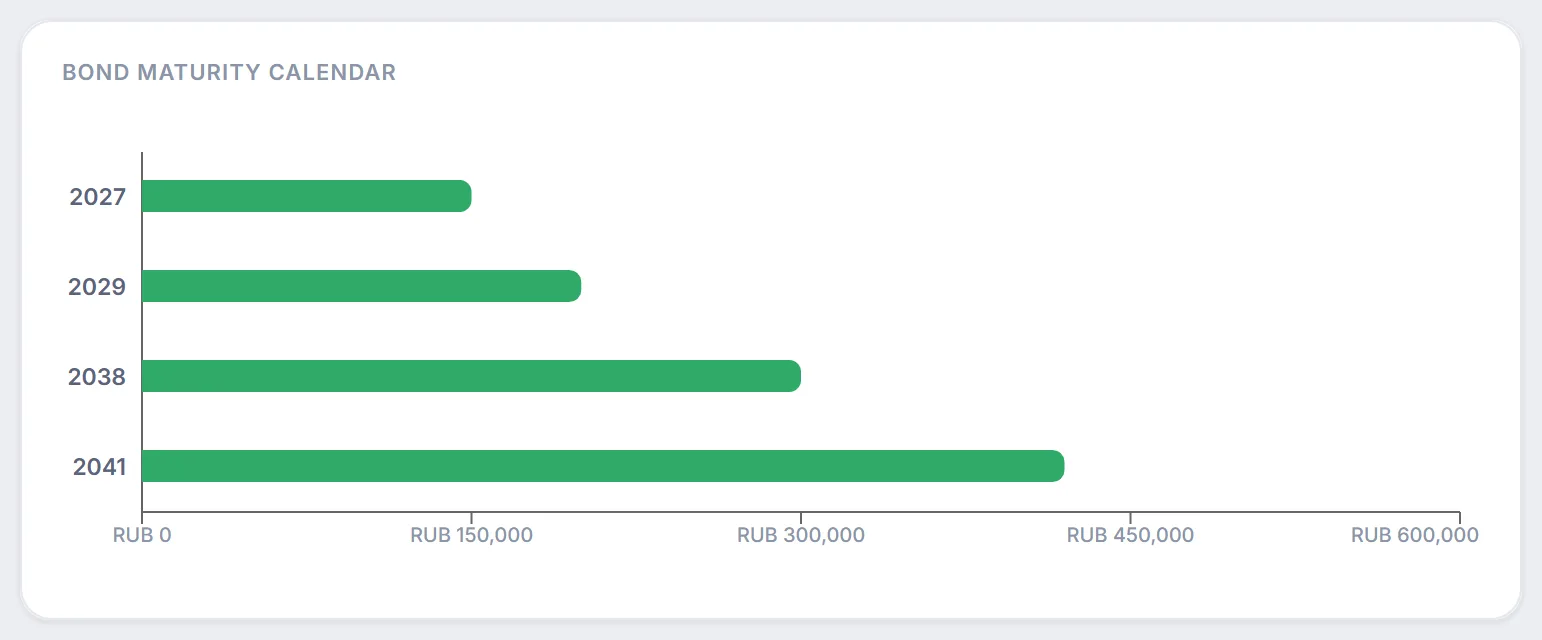
- Each row is a calendar year in which face value payments are expected. Years without redemptions are not shown.
- The bar length is the year's total in rubles: maturities and amortizations of all bonds in the account, multiplied by the number of bonds.
- Hover over a bar to see "Maturities in …": the securities with the amount for each, a "pcs × amount per bond" line and the current price ("market"), with "Total for the year" at the bottom.
4. Maturity details for a year
Click a year's bar and a "Maturity Details for …" list opens over the chart:
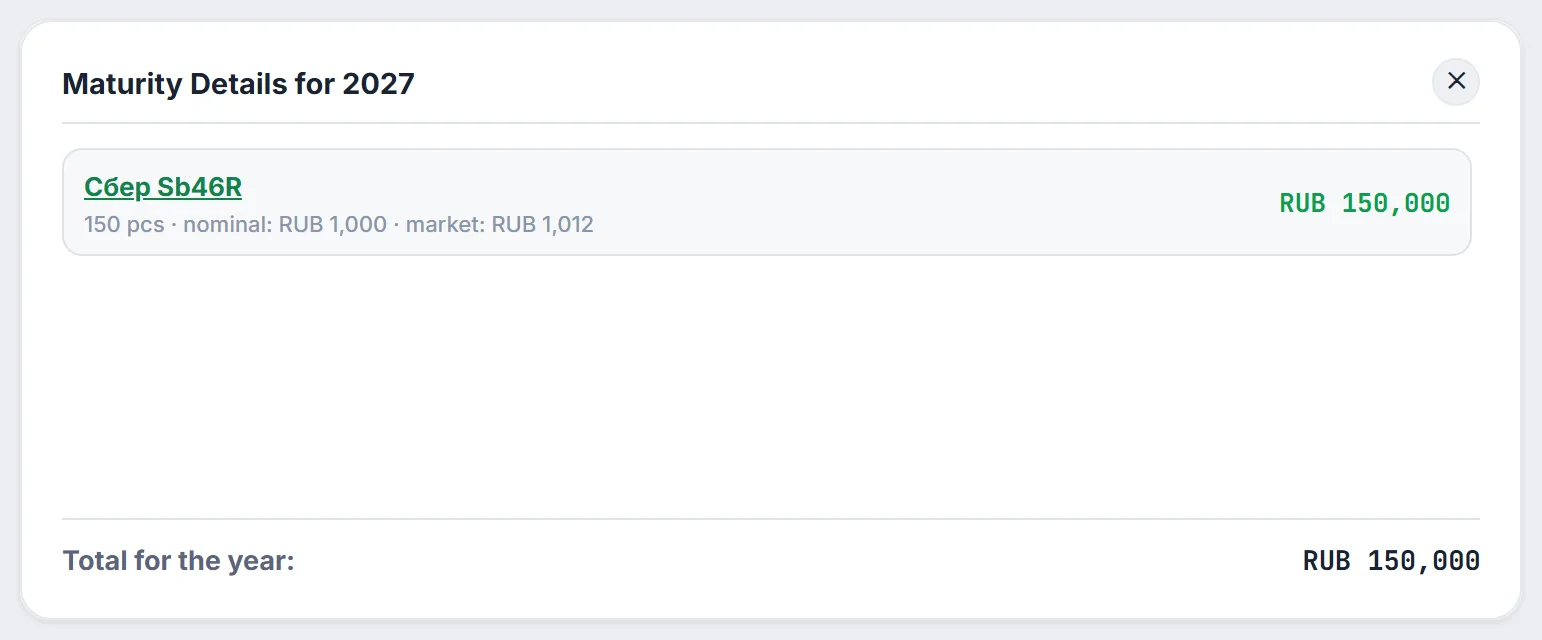
- Security name — a link to its page with the price chart, coupons and amortizations (see bond analysis).
- "pcs" — how many bonds you hold.
- "nominal" — how much comes back this year per bond: the year's amount divided by the quantity. For a bond redeemed in full this is its face value; for an amortizing bond, it is the part of the face value paid that year.
- "market" — the current price of the bond. If it is above face value, you will receive less at redemption than the bond is worth now; if it is below, more.
- On the right is the amount per security for the year, and at the bottom "Total for the year". The cross in the corner takes you back to the chart.
5. What goes into the calendar
- Amortizations — partial face value payments on the issuer's schedule, from today onward.
- Maturity — the remaining face value on the date of the last scheduled payment. If the bond amortized, only the remainder counts; if the last amortization falls on the maturity date, there is no separate maturity row.
- Amounts are multiplied by the number of bonds in the account. Coupons are not included — they live in the payout calendar.
- Put options (offers) are not included: only amortizations and maturity from the payment schedule are counted. If you plan to tender a bond at an offer, the money will come back earlier than the calendar shows.
- Bonds for which no payment schedule could be obtained are skipped.
When amounts are hidden, "Total for the year" is replaced with dots and the amount axis under the chart is hidden.
6. How to use the calendar
- Planning purchases. You can see in which year money frees up and how much, and decide in advance where to put it.
- Maturity ladder. If the bars are roughly equal and follow each other, capital returns evenly; one tall bar is a reason to spread redemptions across years.
- Link to duration. The further out the main redemptions, the higher the duration and the portfolio's sensitivity to rates — check it with the rate stress test.
- Forecast horizon. The year of the latest redemption (but no less than 8 years out) sets the length of the forecast in the Reinvestment vs Simple Return block.
7. Frequently Asked Questions (FAQ)
Why is my bond missing from the calendar?
Check that the account holding the bond is selected in the header and that the position is not hidden. Another reason is a missing payment schedule: then Firewire cannot learn the amortization and maturity dates and skips the bond.
Why does the year total differ from face value × quantity?
If the bond amortizes, part of the face value comes back earlier and lands in other years, while only the remainder arrives in the maturity year. Click the bars to see the breakdown by year.
Are coupons included in the redemption amounts?
No. The maturity calendar shows only the return of face value. Coupons and dividends are in the Payout Calendar section.
Can I see the exact maturity date?
Yes: the "Maturity Calendar" dashboard widget shows the three nearest events with dates. The full payment schedule of a bond is on its page, linked from the name in the year details.