

Firewire Appearance: Design, Theme and Fonts
Portfolio analytics means a lot of numbers on screen, and they are easier to read in a form that suits you. The Appearance section lets you choose one of three app designs, a light or dark theme, font size and typeface, a background tone and card borders, while the Content Width button fits the workspace to your monitor.
- Three designs: Firewire (free), Broker Cabinet and Flat (paid plans).
- Fonts for everyone: text size 12–20 px, 20 ready-made typefaces, System UI or your own font file up to 5 MB.
- Fine-tuning: in Broker Cabinet and Flat you can change the accent color, corner radius and scrollbar width.
- Where it is stored: design and theme in your profile, everything else only in this browser.
- Content width: a floating button in the bottom-left corner, from 800 to 1920 px.
1. Where to find the appearance settings
Open Settings and switch to the “Appearance” tab. Everything sits in one widget (its header currently appears in Russian, «Дизайн и цветовая тема», “Design and color theme”): the design picker at the top, then the font size and typeface panel, background tone, card border style, color theme and the web app (PWA) installation block.
To the right of the “App Design” heading there is a status badge: “Premium Active” on a paid plan or “Basic Access” on the free one.
2. Three app designs
A design changes the whole interface at once: cards, tables, navigation and the accent color. Hover over a design card to see a preview of its elements with a short description of the style.
| Design | What it looks like | Access |
|---|---|---|
| Firewire | Soft cards with 12 px rounding, emerald accent, smooth charts. | Everyone, including the Free plan |
| Broker Cabinet | A contrasting “terminal” grid with 4 px rounding, blue accent and dense table layout, like a trading terminal. | Paid plans (“Premium” badge) |
| Flat | Sharp corners without rounding or shadows, clean borders, orange accent. | Paid plans (“Premium” badge) |
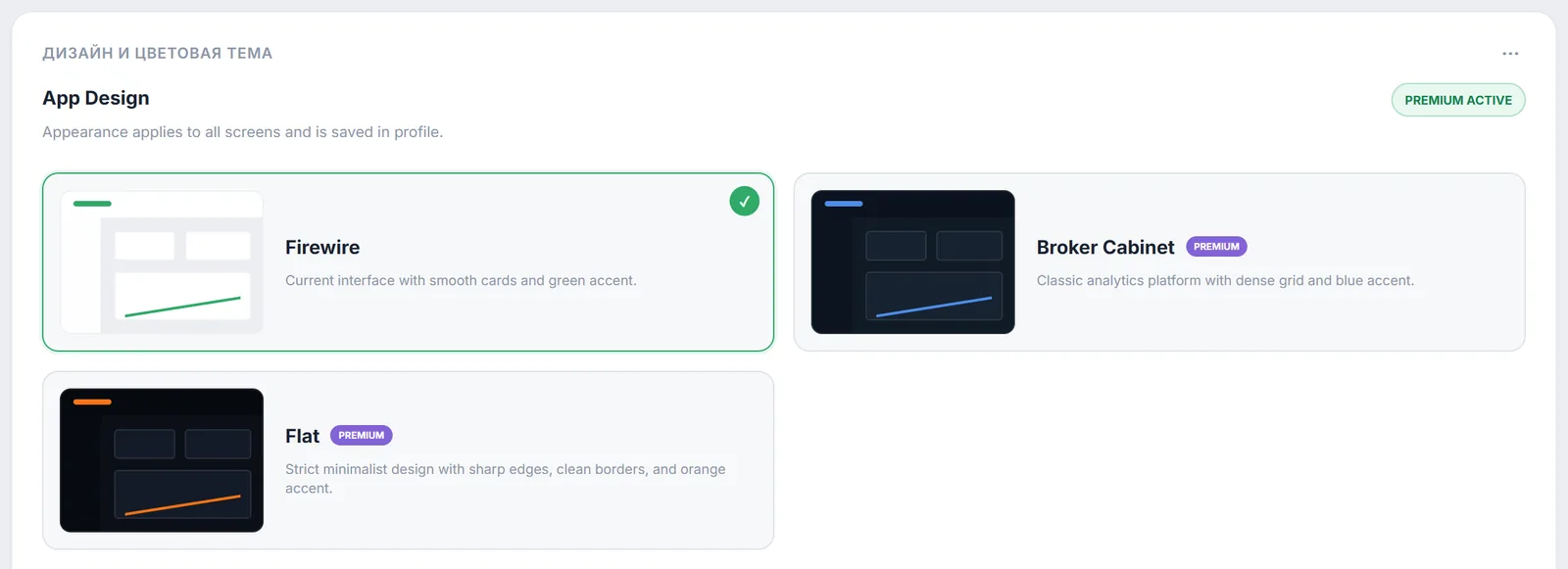
To change the design, just click its card. The choice is saved in your profile, so after you sign in on another device you get the same design. If you are on the free plan and the design is marked “Premium”, a “Premium Design” notification appears and Firewire opens the Subscription tab; plans are compared on the pricing page.
3. Accent color, corner radius and scrollbar
When Broker Cabinet or Flat is selected on a paid plan, a “Granular Customization” panel appears under the cards with a “Default” / “Customize” switch. In “Customize” mode you get:
- “Interface Accent Color”: preset palette colors or any color via “Pick custom color”;
- “Element Border Radius”: a slider from 0 to 16 px, from strict right angles to soft cards;
- Scrollbar width: from 0 to 12 px; 0 hides the scrollbar completely.
The Firewire design does not show this panel: its accent and rounding are fixed.
4. Text size and interface font
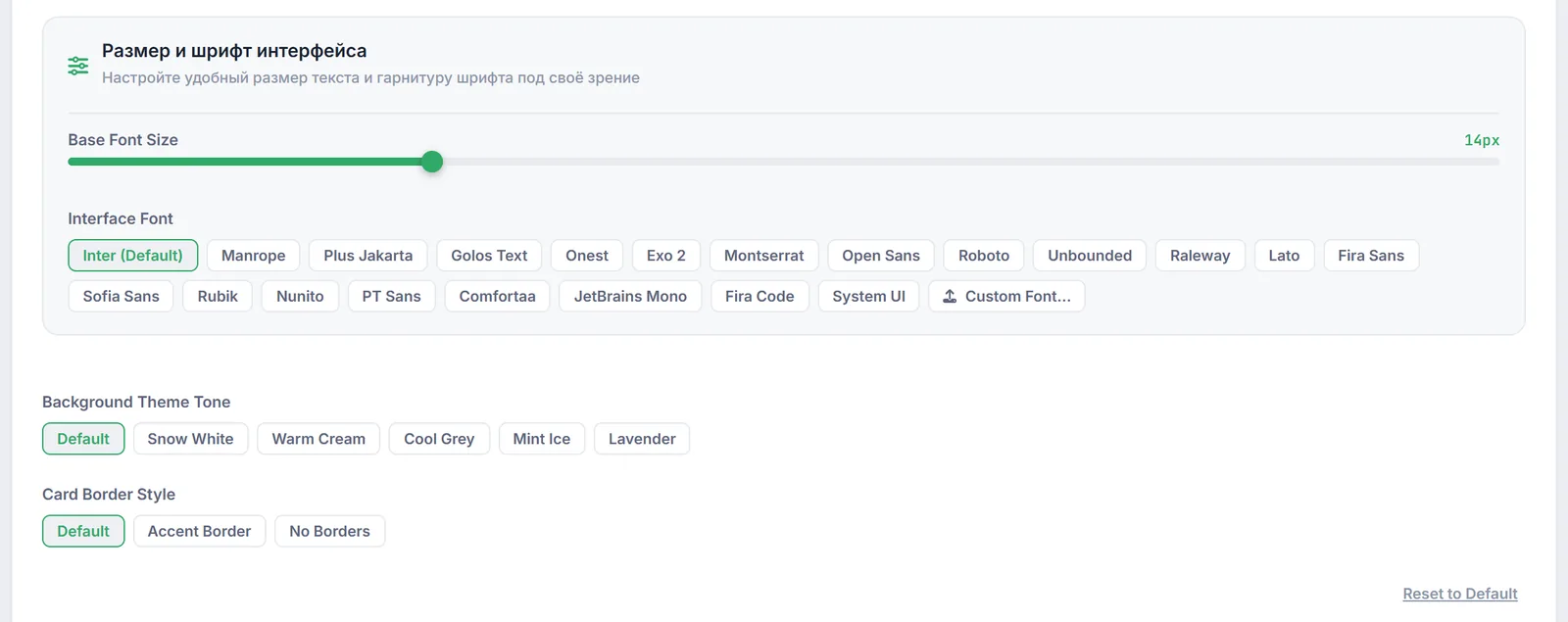
The font size and typeface panel (its heading currently appears in Russian, «Размер и шрифт интерфейса») is available in every design, including on the free plan.
- “Base Font Size”: a slider from 12 to 20 px (14 px by default). Handy when numbers look small on a large monitor or, conversely, when you want more rows on screen.
- “Interface Font”: Inter (default), 19 more typefaces (Manrope, Golos Text, Onest, Montserrat, Roboto, PT Sans, JetBrains Mono, Fira Code and others) and System UI, your device's system font. Hovering over a font button shows a text sample.
- “Custom Font...”: upload your own
.ttf,.woff,.woff2or.otffile up to 5 MB. After the upload you will see “Loaded font: …” and a “Delete” button.
5. Background tone, card borders and theme
“Background Theme Tone” depends on the current theme. For light: “Default”, “Snow White”, “Warm Cream”, “Cool Grey”, “Mint Ice”, “Lavender”. For dark: “Default”, Midnight, Slate, “Pure Black”, “Graphite”. When you switch the theme, a tone belonging to the opposite theme resets to “Default”.
“Card Border Style”: “Default”, “Accent Border” (a border in the accent color) or “No Borders”.
“Color Theme”: “Light” or “Dark”, available for each design and saved in your profile. You can also switch the theme with the moon button in the app header.
The “Reset to Default” button under these settings discards all personal tweaks (font, size, tone, borders, accent) and restores the standard look of the selected design.
6. Content width
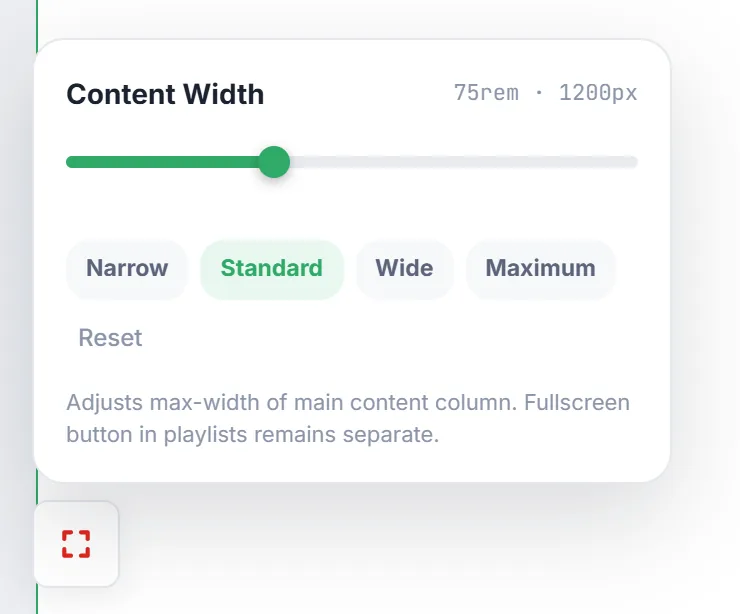
On a wide monitor tables and charts may stretch too much, on a narrow one they get squeezed. In the bottom-left corner of the workspace there is a floating “Content Width” button. It opens a panel with a slider from 800 to 1920 px (16 px steps) and quick presets “Narrow” (960), “Standard” (1200), “Wide” (1600) and “Maximum” (1920). The reset button returns the standard 1200 px.
7. What is saved in the profile and what in the browser
- In your profile (follows you to other devices): the selected design and color theme.
- Only in this browser: font size and typeface, background tone, border style, accent color, corner radius, scrollbar width and content width. On a new device or after clearing site data you will need to set them again.
- A custom font is uploaded to Firewire storage, and the link to it is remembered in the browser. If the upload fails, the font is stored right in the browser.
- Background tone and border style take effect together with personal appearance settings: they turn on when you change the size or font, or choose “Customize”.
8. Frequently Asked Questions (FAQ)
Why can't I select Broker Cabinet or Flat?
These designs are marked “Premium” and are available on paid plans. On the Free plan Firewire shows a “Premium Design” notification and opens the Subscription tab.
Can I make the font bigger on the free plan?
Yes. The font size and typeface panel works in every design and on every plan: size from 12 to 20 px, preset typefaces, System UI or your own font file.
I set up the font on my computer, but my phone looks the same as before. Why?
Font, size, background tone and other personal settings are stored in the browser of each device. Only the design and color theme are saved to your profile.
How do I restore everything?
Click “Reset to Default” in the Appearance section and choose the Firewire design. Content width is reset by the reset button in the Content Width panel.