

Portfolio Comparison & Public AI Copilot Analysis
Comprehensive guide to comparing multiple portfolios side-by-side: asset allocation breakdown, sector weights, risk metrics, and online querying with Firewire AI Copilot.
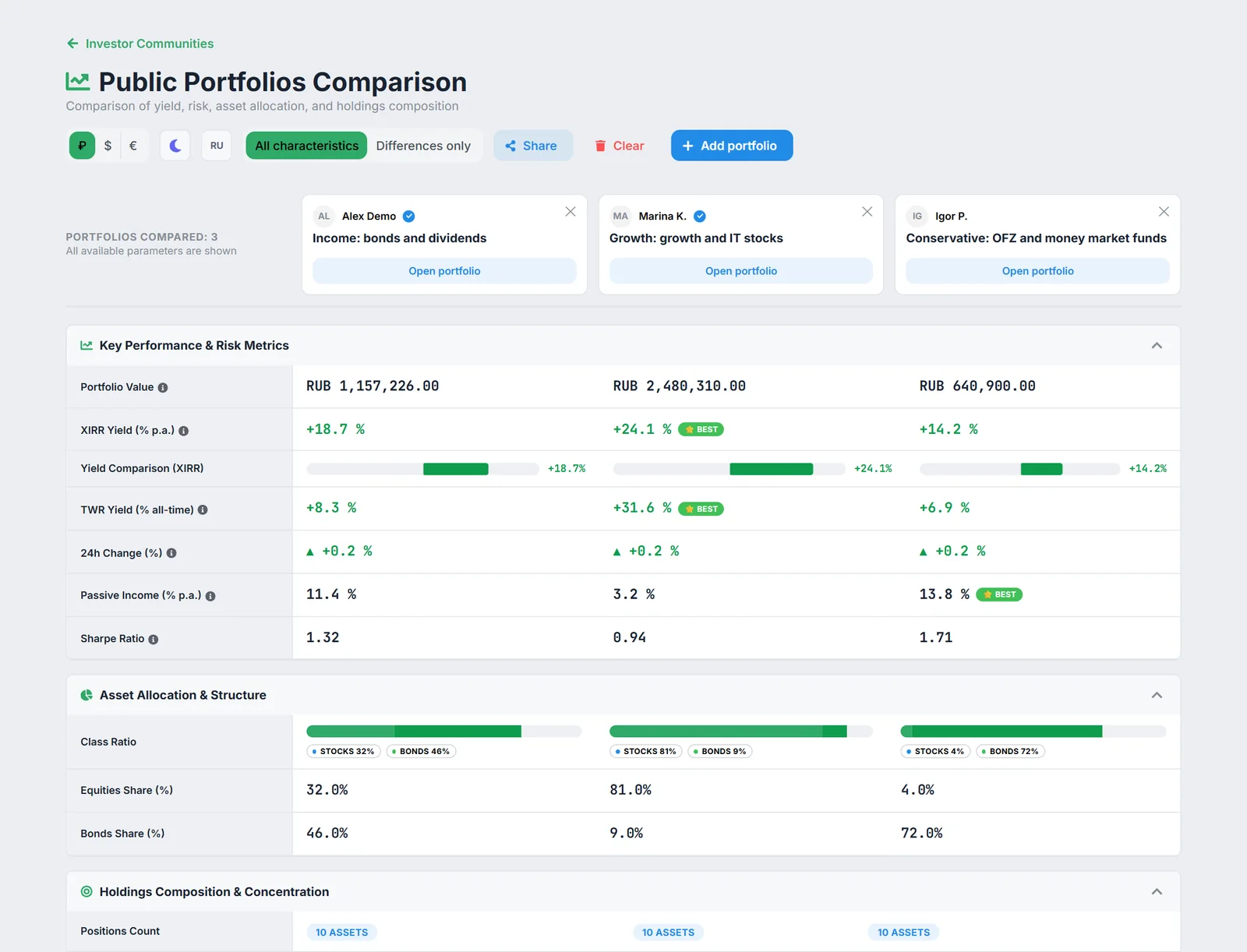
The Portfolio Comparison tool enables comparing up to 5 portfolios simultaneously — both your own accounts and public portfolios via sharing links. Contrast equity, bond, and gold allocations, benchmark TWR and XIRR returns, and leverage AI Copilot for instant comparative intelligence.
1. Why Compare Investment Portfolios
Investors frequently run multiple accounts tailored to distinct goals or compare their holdings against benchmark portfolios from advisors. Side-by-side comparison solves key challenges:
- Strategy benchmarking: evaluate defensive fixed-income structures against aggressive dividend equity portfolios.
- Benchmarking against shared portfolios: compare your allocation against public community portfolios shared via secure links.
- Detecting hidden overlap: discover duplicate single-stock exposures and sector concentration risks (e.g. over 35% in Energy or Financials).
- Concentration scoring: calculate and compare effective number of holdings and the Herfindahl-Hirschman Index (HHI).
2. Adding Portfolios to Comparison
Access the tool via /compare or the «Portfolio Comparison» navigation link:
- Select personal accounts: check the boxes next to your configured accounts in the selector.
- Add shared portfolios: paste any valid share token or full link (
https://fire-wire.ru/shared/:token) into the input box and click «Add». - Automatic sync: the platform retrieves normalized snapshots and renders comparative charts in real time.
3. AI Copilot on the Comparison Page
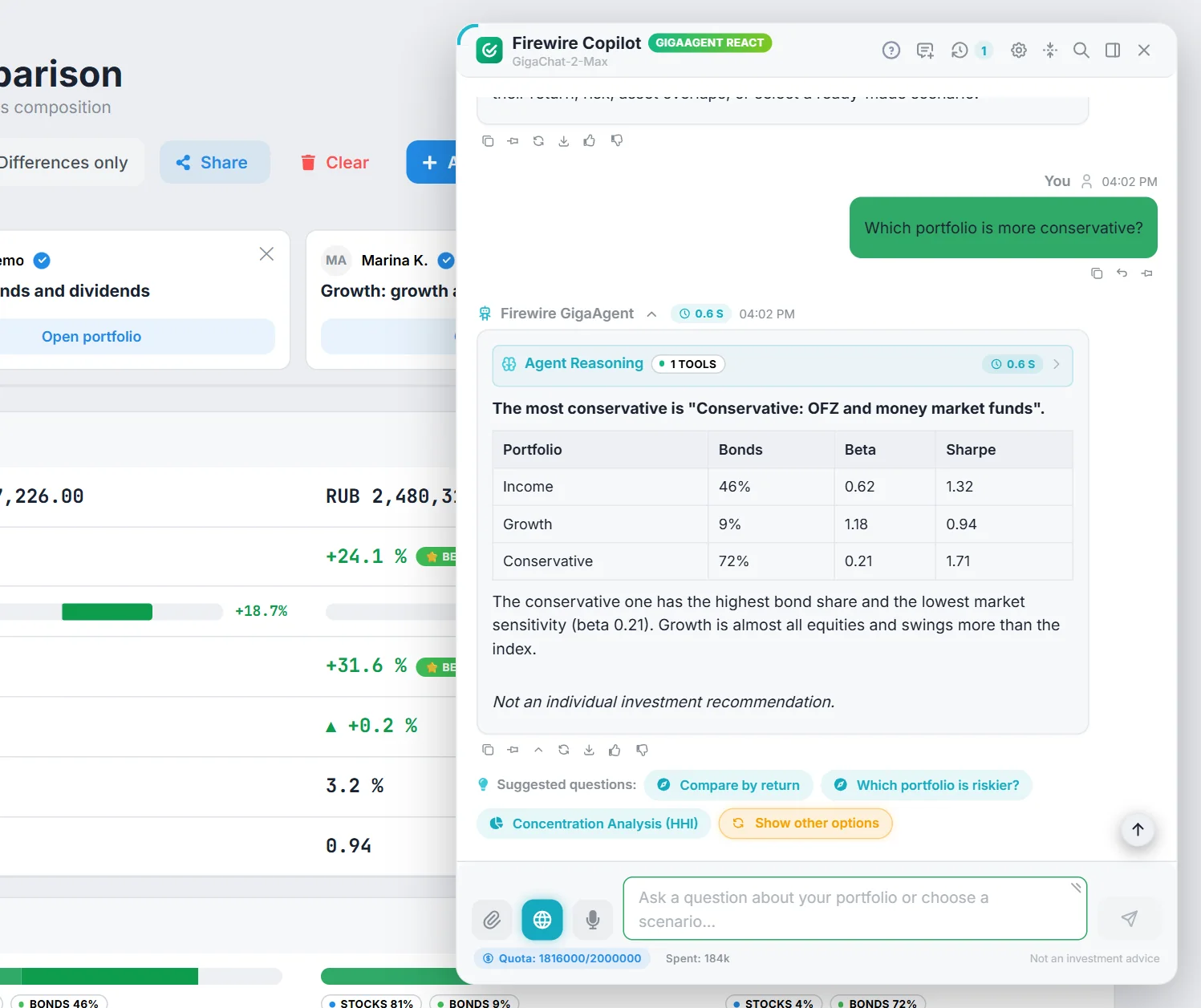
Starting with version 1.75.27, authenticated users can invoke AI Copilot directly on the comparison page via the floating chat trigger in the bottom-right corner.
Multi-Portfolio Copilot Capabilities:
- Focused Quick Starters: upon opening the dialogue, Copilot presents relevant follow-up prompts:
- «Which portfolio is more conservative?» — checks bond weights, duration, and volatility;
- «Compare returns» — contrasts TWR/XIRR and inflation-adjusted real returns;
- «Which portfolio has higher risk?» — evaluates drawdown, Beta, and HHI concentration.
- Public Model Context Protocol (MCP) Tools: Copilot utilizes the specialized
get_shared_portfolios_comparisonMCP tool, passing an array of active tokens to execute deterministic computations. - Session Isolation: conversation threads on the comparison page are stored separately from your primary account chat, preventing context contamination.
4. Privacy and Confidentiality
Firewire enforces strict data minimization when comparing portfolios:
- Masked currency values: when an owner enables anonymous sharing, only percentage asset weights are shared. Absolute monetary amounts are never exposed to Copilot or other users.
- No transaction ledger exposure: comparison routines process aggregated position weights, never revealing private deposits, withdrawals, or individual trades.
- PII Sanitization: account identifiers and investor identity details are scrubbed prior to model invocation.
Benchmarking Tip
For objective comparison across differing cash flow schedules, focus on Time-Weighted Return (TWR), which isolates market performance from deposit timings.