
Model Context Protocol (MCP) & Financial AI Tools
Complete architectural guide to Model Context Protocol (MCP) within Firewire: how generative neural models invoke deterministic backend functions, public portfolio analysis methods, and BYOK LLM key integration.
Model Context Protocol (MCP) is an open specification enabling AI Copilot to execute verified financial computation modules in Firewire as deterministic tool calls. Instead of hallucinating return percentages or bond durations, LLMs retrieve exact mathematics from Firewire's verified backend engine.
1. How MCP Operates in Firewire Architecture
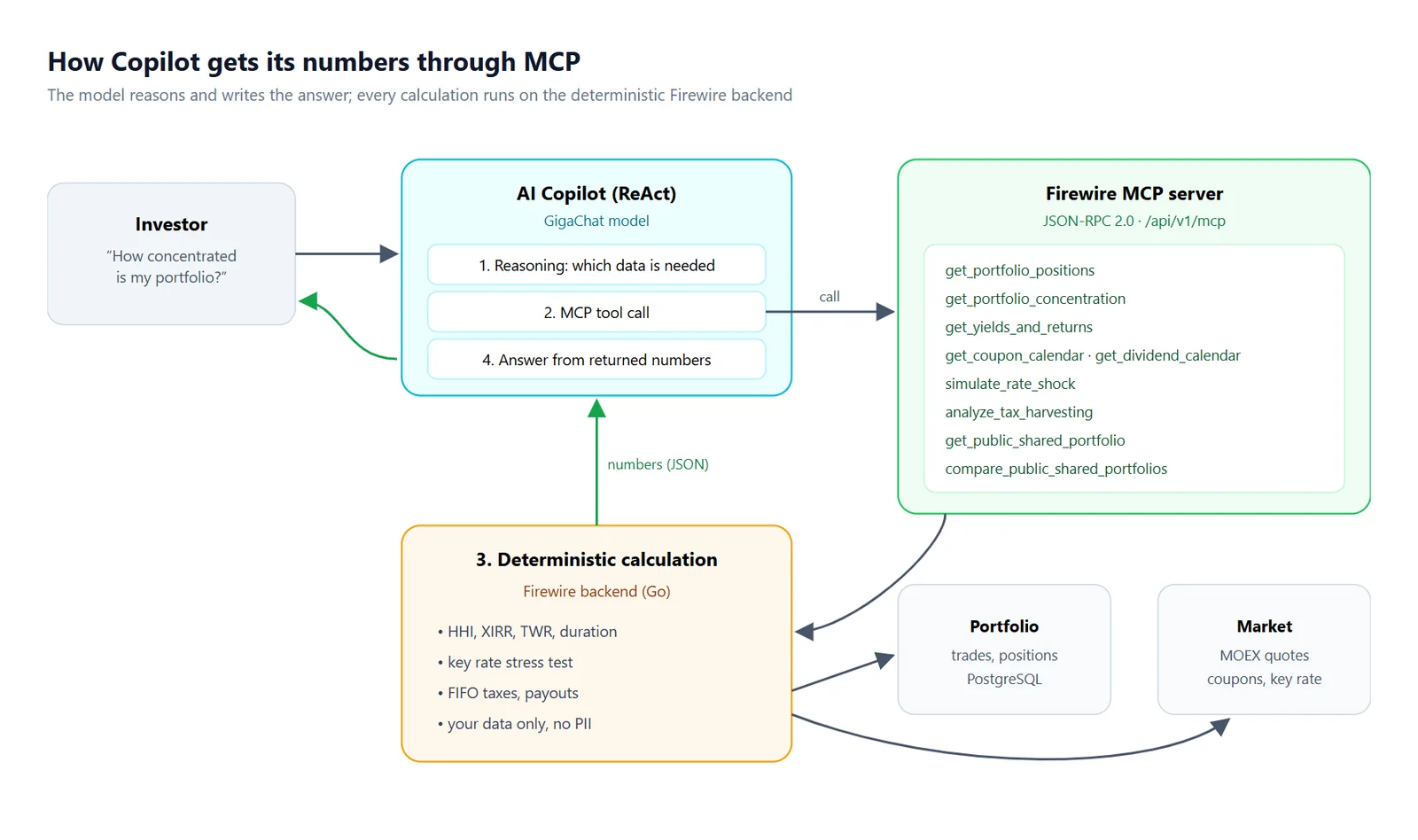
Large language models excel at synthesizing complex findings and articulating financial rationale, yet struggle with precision math. Firewire solves this through a ReAct (Reasoning + Acting) agent framework coupled with MCP:
- Reasoning: the agent parses the user's intent to identify required metrics (e.g. HHI concentration or XIRR).
- Action (MCP Tool Call): Copilot constructs a structured tool invocation with specific parameters directed to Firewire's MCP server.
- Execution: the platform calculates results deterministically using real-time market feeds and vetted quantitative finance formulas.
- Observation & Response: structured outputs return to the model, producing clean, verifiable analytical answers.
2. Public MCP Tools for Sharing and Comparison
Version 1.75.27 introduces specialized tools designed for publicly accessible portfolio data:
| MCP Tool | Parameters | Returned Analytical Intelligence |
|---|---|---|
get_shared_portfolio_analysis |
share_token (access token) |
Aggregated public portfolio allocation by asset class (stocks, bonds, funds), top weight percentages, HHI concentration, and weighted bond duration. |
get_shared_portfolios_comparison |
share_tokens (array up to 5 tokens) |
Comparative matrix of asset allocations, TWR performance, volatility, risk scores, and overlapping holdings across multiple shared accounts. |
3. Security and Permission Boundaries
Public MCP endpoints adhere to strict data privacy principles:
- Private account isolation: public tools only inspect portfolios with explicitly generated public share tokens created in «Portfolio Sharing». All other user accounts remain inaccessible.
- Zero absolute monetary leakage: under anonymous sharing mode, MCP responses return strictly normalized weights ($\sum w_i = 100\%$) and never reveal absolute currency values.
- No historical cash flow exposure: public tools do not provide transaction logs, deposit dates, or private withdrawal histories.
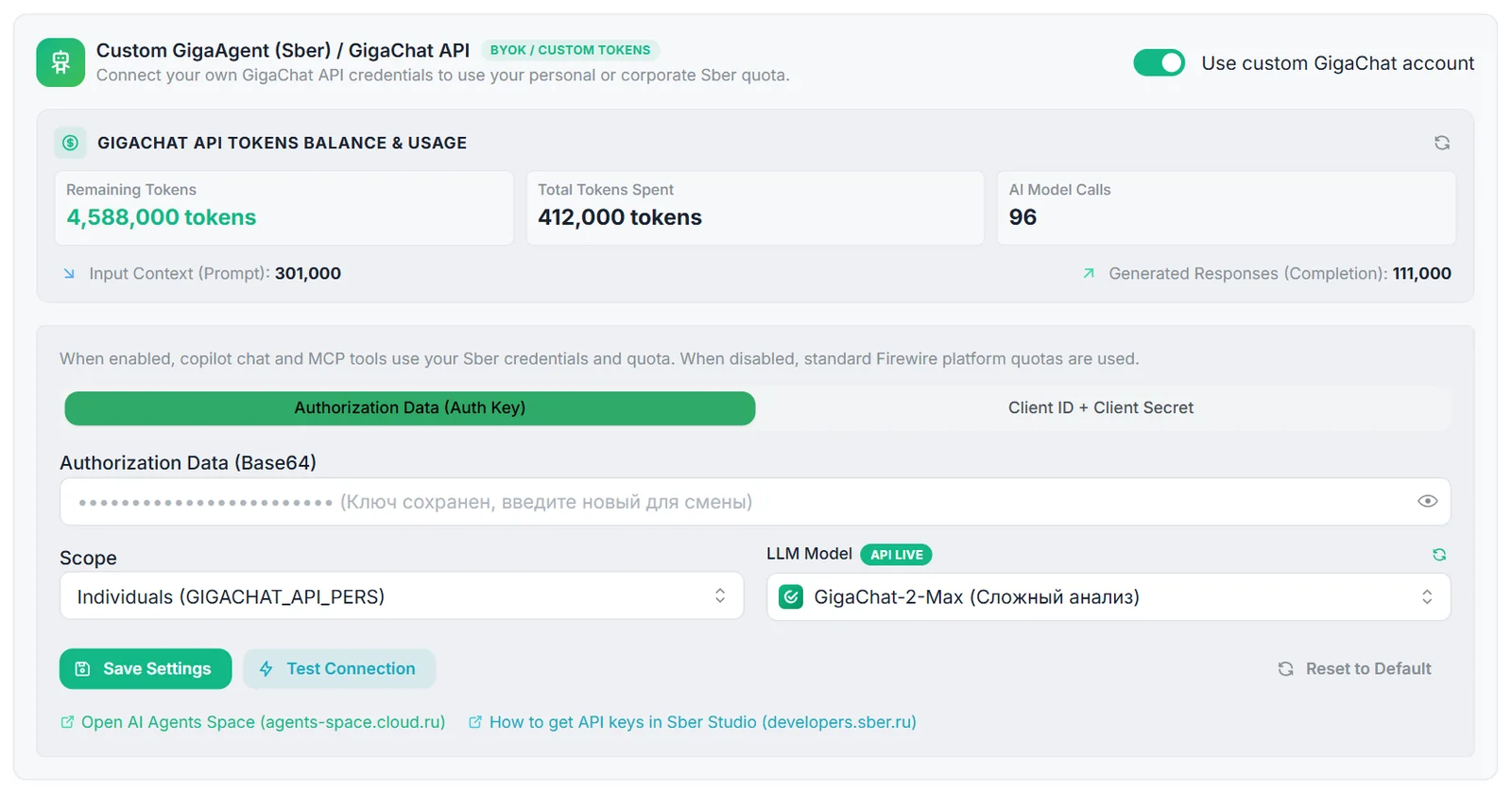
4. Bring Your Own Key (BYOK) Setup
Connect your personal GigaChat account to unlock unlimited AI queries:
- Navigate to «Settings» → «MCP & AI Agents» in the web application.
- Provide your
Auth KeyorClient IDandClient Secretcredentials. - Select your preferred model: standard,
GigaChat-Pro, orGigaChat-Maxfor heavy portfolio simulations. - Once saved, all tool executions draw directly from your personal API quota without platform limits.